Pixel 11 HiLight gets messaging support and new colors in latest update
What is HiLight and why it matters
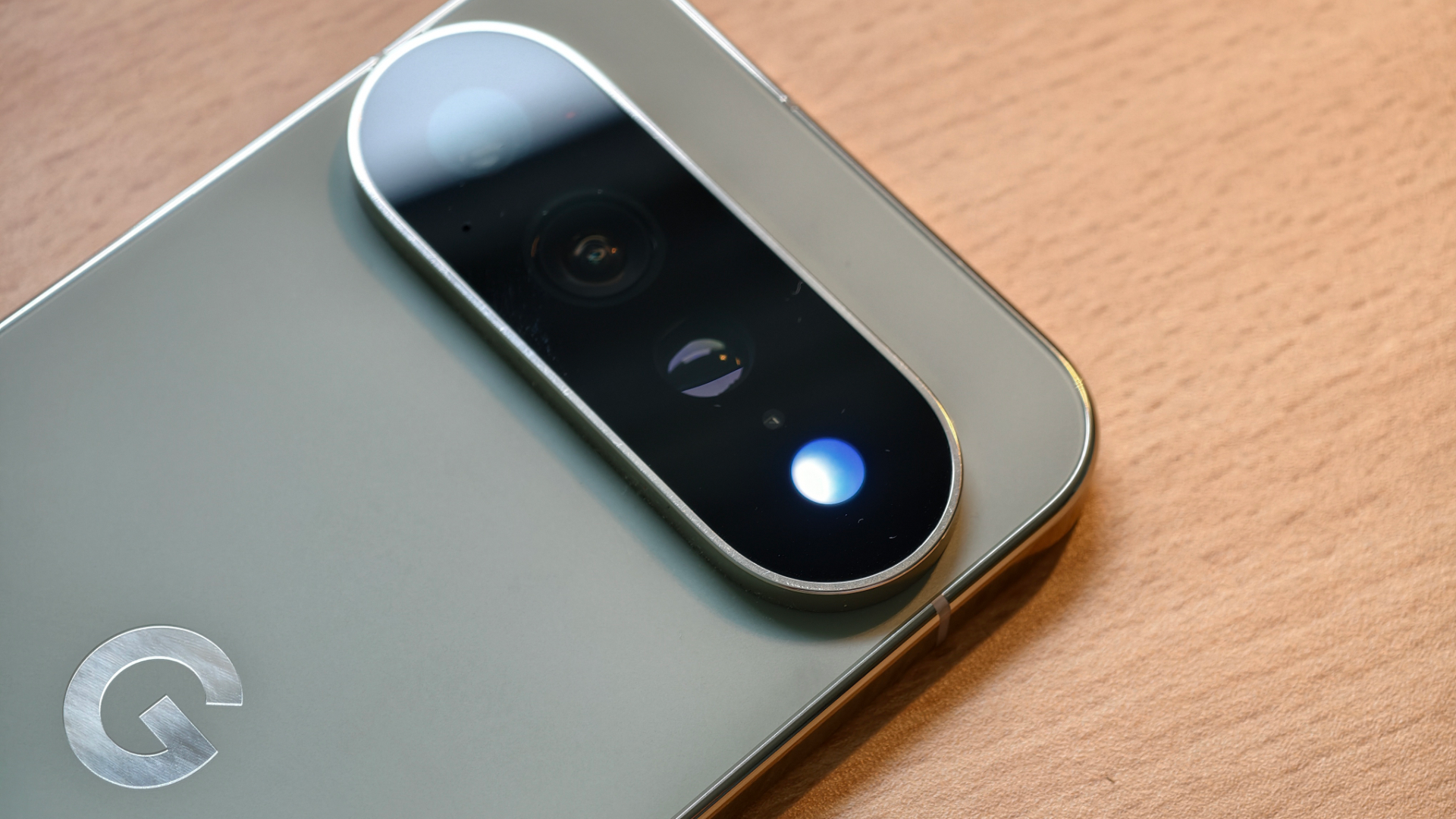
Google introduced the HiLight notification light with the Pixel 11 series, embedding a tiny LED inside the camera flash on the back of the device. The feature is exclusive to the Pixel 11 Pro and Pixel 11 Pro Max models, offering a discreet way to see who is calling or messaging without turning the screen on. While competitors such as Samsung Galaxy S24 and Apple iPhone 15 Pro rely on always‑on displays for similar alerts, HiLight provides a low‑power alternative that works even when the phone lies face down.
Original limitations of the feature
At launch the HiLight system was functional only for favourite contacts and for interactions with Google Gemini. Users could not assign custom colors or use the light for third‑party messaging apps. The result was a novelty that felt half‑baked, especially compared with the richer notification ecosystems on devices like the iPad Air M2 or Apple Watch Series 10, which can vibrate, flash, and display detailed alerts.
November Pixel Drop brings messaging support
The recent Android 17 QPR2 Beta 5 update, spotted by Android Authority, expands HiLight to include messages from Google Messages and WhatsApp. When a Pixel 11 Pro is placed face down, the LED will flash in a pattern that indicates a new message, and the color can be set to represent the app that generated the alert. This brings the feature in line with what users expect from modern smartphones, allowing a silent cue for incoming chats without waking the device.
New color options on the horizon
Early code hints also suggested an increase in the available color palette, growing from five to nine hues. The proposed additions include blue, red and two shades of green, joining the original teal, yellow, pink, purple and white. Although the rollout has not yet confirmed the new colors, the expanded palette would let users personalize alerts for different contacts or apps, similar to how Android users can set custom notification tones on the Pixel 12 or Samsung Galaxy S24.
How HiLight compares to other notification solutions
While the Pixel 11 Pro’s HiLight remains a hardware‑based LED, many flagship phones now rely on software‑driven edge lighting or always‑on displays. The Samsung Galaxy S24, for example, uses a side‑edge panel that glows for notifications, and the Apple iPhone 15 Pro can display a subtle lock‑screen flash. HiLight’s advantage is its ultra‑low power draw, making it ideal for users who want to preserve battery life while still staying informed. The new messaging support narrows the gap between the Pixel and its rivals, offering a silent cue that works across both native and third‑party apps.
What to expect next
Google has not announced a specific timeline for the color expansion, but the presence of the code in the QPR2 branch suggests an imminent rollout. Users should keep their devices updated through the Android beta program to receive the latest HiLight enhancements. As the ecosystem evolves, we may see further integration with services like Google Assistant or even third‑party apps beyond WhatsApp, turning the modest LED into a versatile notification hub for the Pixel 11 Pro and future Pixel models.