RedMagic Nova Gaming Pad – The BEST Gaming Tablet

A deep dive into the highly anticipated red magic Nova gaming tablet from its powerful internals to its smooth display. This tablet promises to offer an unraveled gaming experience, but does it live up to the hype stick around as we break down.


Itself pop up on the here and we have the red magic Nova itself in this paper sleeve


I’m liking this all black interior. And we have two boxes housing the accessories, We have the 80w charging brick but this is the EU version. I believe but red magic kindly provide a three pin adapter for UK buyers damn that’s going to stick out from the wall we get a red USB C to USB C cable which is nice and thick. A quick start guide and finally some cool red magic stickers with metallic effects.


The design of the tablet up front we have the 10.9 in LCD display, To the right we have two speakers the 3.1 Gen 2 USBC Port which does support external displays more on that later and a microphone around the bottom are the pin connectors for the magnetic keyboard which I unfortunately couldn’t purchase because of it not being in stock when I purchased this tablet to the left we have two more speakers and the power/lock button which is also the fingerprint reader. And then up top are the volume buttons nice and clicky.


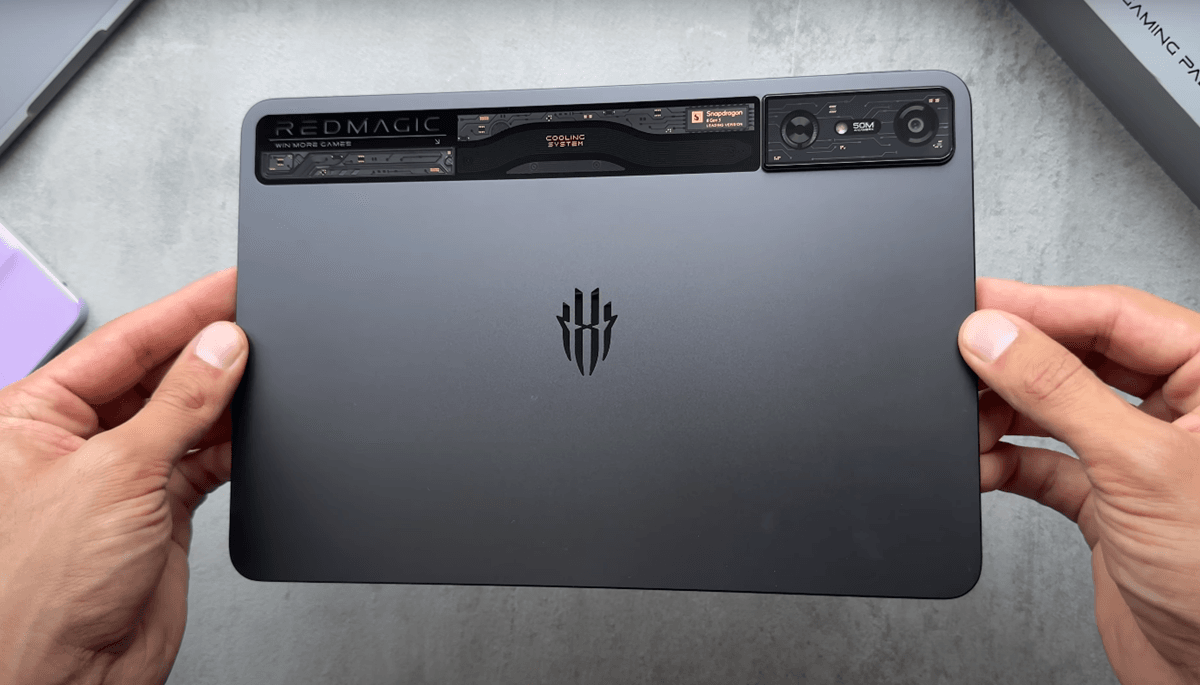
Two more microphones and the Magnetic attachment for the red magic stylus more on that later too we have the front-facing 20 mega pixel camera and turning to the back. That’s where the part is at the red magic Nova has a metal unit body design in an anodized finish and up top running the length of the tablet is this futuristic looking glass enclosure which is housing the fan processor and Camera along with cooling components.


It also has a custom RGB lighting component which up with media playback charging and other functions. It’s a nice element differentiating it from the sea of land backs of tablets things missing on this tablet though there’s no SD card slot and also no cellular connectivity options at least for the UK version also it would have been nice to have seen a headphone jack on here.


A highlight of the Red Magic Nova is the built in cooling fan which effectively prevents the tablet from overheating and affecting performance with things such as throttling. And they have set up the tablet with 3D internal circulation air do there’s n layers of heat dissipation which can reduce core temperatures by 25°. Red magic claiming that is the first tablet with PC level 3D heat pipe technology and then these are kind of the dimensions of the various components.


We’ll have a quick look at the red magic Nova stylist in the Box we get a user guide a spear tip stus itself which is finished in this matte black plastic and has two action buttons on it it attaches magnetically to the top of the tablet and charges via NFC from here too with a battery life up to 16 hours of continuous.


Nova has a 2.8 k 10.9 in LCD display with a 16 by 10 aspect ratio


Now for the display the red magic Nova has a 2.8 k 10.9 in LCD display with a 16 by 10 aspect ratio and up to 144 HZ refresh rate. It is also STS certified for low blue light and comes with 840 HZ touch sampling rate Peak brightness is 550 nits so not exactly the brightest but it’s reasonable. And then additional settings are things like dog mode read mode Night Light you can adjust your color temperature from colorful standard to soft. You also have your generic color functions and then for refresh rate. We have various options from Auto all the way up to 144 Hz. YouTube playback supports 4K 60 FPS HDR, Of course the display doesn’t have HDR compatibility and Playback runs fine with colors, but we are getting that super contrast of an AMOLED panel.


We have web level one on Netflix and Full HD playback resolution and of course no HDR capabilities, Which I have to say after using the honor magic pad 2 really does make the viewing experience so much better but the LCD panel on the red magic Nova is good the high 312 PPI makes everything look nice and sharp and 144 HZ refresh rate is Buty smooth.


Viewing angles are typical of an LCD display with a slight color shift to warmer tons at extremer Angles and you can see that more on whiter backgrounds. As for the red magic NOA stylist it’s a decent pen which supports Palm rejection. And latency isn’t too bad but in real life use it’s nice and precise and the lightweight of the pen is good for long usage sessions. Outdoor visibility isn’t too bad to be honest I was expecting it to be worse but in the brighter conditions the display is still legible so that’s good.


We have four speakers on the Redmagic Nova flanking both sides of the tablet these are DTS tuned and in the settings, you can turn DTS sound on and off. You can also select your headphone type and then you have various sound settings such as smart selection music so you can adjust from different EQS, or you have movie and game.


RedMagic Nova Gaming Pad is an innovative gaming tablet that offers unparalleled performance and cutting-edge technology. The device is equipped with a high-quality speaker system that delivers immersive sound quality for an enhanced gaming experience.


When it comes to Performance and one of the highlights of the red magic Nova


We’re working with the Snapdragon 8 & gen 3 leading version. CPU which is boosted to 3.4 GHz and Adreno 750 GPU, frequency increased to 1 GHz, I have the 16 GB Ram version but it’s also available in 12 GB.  Redmagic do promise one year OS upgrade up to Android 15 and for Ram you can expand that by an additional 12 GB totaling 26 GB, so you’ve got RAM for days. Benchmarking geek bench 6 we get single core score of 2,261 multicore score of 6,740 so as expected high scores Wildlife extreme stress test.


We can see maintained quite good Loops performance range with a little bit of dips here and there and the performance monitor showed us the battery went from 34 to 21%. The battery temperature from 24 to 40 and a frame rate of 20 fps to 30 FPS. For read R speeds we can see 742 on right and 1.8 on re just going to connect my external drive runing a file from my USBC 3.0 external hard drive to the red magic Nova we a bit slow looks like it’s Runing around 10 megabyte a second but I guess 3.1 compatible Hardware would perform a lot better. We’ll check out what we have in the settings, So normal stuff in Wi-Fi obviously Bluetooth.


I’ve got three different connections here connectivity air plan mode, Hotpot and tethering connected devices. We have Zed smart cost which allows you to cost your tablet other devices we have Styler settings and obviously keyboard and touchpad.


If you have that accessory, you have sync mind AI system engine which is kind of like an overview of your tablets current state and performance. And then various options for the cooling fan you can have balance or fast cooling and various other options for fast cooling whilst charging you can mute the fan during calls. You can have a startup light and a startup sound and then just generally browsing around the tablet I mean the OS is okay it’s not the best out there it’s not the most polished but it’s okay.


We have a quick look at control panel, and you can also use popup windows with with a limit of three so just an example here and I used three different popup windows, and the tablet was running absolutely fine so it can handle those and then we’ll have two pop-up windows with one main window and again running absolutely fine.


Upload times are super Snappy as you would expect because of the Snapdragon 8 gen 3 and general overall performance of the tablet is absolutely fine no hiccups that I noticed, everything loads super-fast and super quick. We’ll just open up a bunch of different apps here and then we’ll launch a heavy app like called of De war zone and see how the Ram manages. If I come out of that and go back to a previous app, and it’s absolutely fine app is still running in the background didn’t have to reset or refresh.


Red magic Nova has a dedicated app called game space


Now for the store of the show, I what this is built for gaming the red magic Nova has a dedicated app called game space and this gaming Hub provides a suite of tools to optimize your gaming sessions. You can optimize performance from Eco battle to rise. You can also adjust GPU settings from standard power saving to high quality or you can have custom and adjust as you please. We also have various plugins that can further enhance your gaming from AI trigger, Scout mode, key remapping and so many others.


You can use them to your hops contain pin and gravity X allows you to add peripherals across a range of Brands and you can customize them as you please I’ve connected my PS5 controller for my gaming session. We’ll start off the gaming test with Cod war zone and in game we can access the game Space settings from a side Spide on either side of the screen all of your options laid out in front of you.


You have all your plugins your various options on the right-hand side right refresh Ray turning the fan on and off and then obviously you can change the mode of the CPU and also do not disturb for the settings. We have Peak visual quality, and I’ll set everything else too high to really push it to the max.


I have a timer on the right so how long I’ve actually been gaming we’re starting off with 100% battery the screen brightness is approximately 75% speakers are around 70% and right off the bat the game is running a dream the peak Graphics make the game look, so good wouldn’t say console level but close enough and we can see the game is running a steady 60 FPS with maybe slight deeps down to 57.


When there’s a bit more action in the game play, so 15 minutes in and I’ll switch down from Diablo mode to rise and see how it performs still managing to hit 60 FPS but we’re seeing the dips here. And there down to 47 and then we’ll come down to Eco and how that PHS and we can see that it’s limited the game to 30 FPS. So now here near as smooth as it was before but if you want to minimize battery drain then this would be the way to go and half an hour in and we’ll jump back into rise and see, how it handles that and it’s holding 60 FPS.
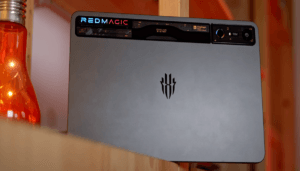


RedMagic Nova


performance of the Snapdragon 8 Gen 3 is beastly, and it can handle those demanding graphics with no problem. So, after nearly half an hour of cold war zone the CPU temperature is around 41° and battery at 36. The fans have been running so the temperatures are reasonable and looks like the fans have been dissipating, that heat well, and battery is down to 90% so we lost 10% in that session.


Now we’ll check out Genjin impact and I’ve set all the settings to the highest possible currently running in Rise mode. And we have a steady 60 FPS, and the game looks really nice really good graphics and it’s running as smooth as it can even with more action sequences, it holds 60 FPS solid with no hiccups switching down to balanced. And the game still runs at a steady 60 FPS. So, no problem, there 40 minutes in all back-to-back gaming and the Redmagic Nova is performing really well maintaining High FPS.


I can feel it warming up a little bit around the back and then after 40 minutes the CPU temperature is at 41 and the batter is at 35°. So, the cooling fans are doing a good job in other tablets by now in more experience those temperatures would have been in the high 40s, and the battery is down to 86%. Holding up well I would say we’ll check out Jaggard and again I’ll set everything to the highest possible in the graphic settings and in jar, it looks like FPS is capped at 45 so although not hitting 60 FPS. It’s still nice and smooth and the game has no problem maintaining.


That 45 FPS come to meet even in more intense scenes there is some fluctuation of FBS dipping down to 42 here and there but nothing drastic and it’s running out running without any hiccups or Jitters. And after 50 minutes temperatures were still good, and battery is down to 83% so overall quite impressed with the performance. We’ll check out GTA VC. And I’ve hooked up the Redmagic Nova to an external monitor via USBC to HDMI adapter and the game runs absolutely fine. As we would expect not the most demanding game but ijy to be able to play you can also obviously link wirelessly to a Telly by find connecting wi the cable is more responsive.


I for pubg the highest graphic quality is being Ultra HDR but when you select that the frame rate is capped to ultra so on those settings the FPS is capped at 40 the game itself looks really good with the graphics and is running smooth enough get in the car but, If you do drop the graphics down to HDR then you can select extreme frame rate which will give you 60 FPS and the game runs fine with no problem at that frame rate.


I guess that could be down to internet connection as well but being able to play VI this method. And running those PS5 Graphics is an absolute joy and the same thing for Red Dead Redemption 2 with no problem screaming the game and again an enjoyable experience after all of that gaming. The remote play the red magic Nova does impress you can really push it to the limits with games and the game Space functionality really elevates. That experience temperatures were well managed, and gameplay itself was Sublime also after all of that the battery dropped down to 72% so obviously faster drain because of the gaming.


Battery the red magic Nova comes with a 10,100 mAh battery


Battery the red magic Nova comes with a 10,100 mAh battery, which supports 80 W fast charging with the included charger which can charge this tablet 0 to 100 super-fast 55 minutes. In fact, as claimed by red magic in my use battery was reasonable. We saw whilst gaming and pushing the tablet it will obviously drain faster but that is mitigated a little with the fan but with General light use like browsing web and watching videos. I managed to get 2 days before having to reach for the charger on the PC Mark battery life test with screen brightness at 75% refresh rate set to Auto and speaker volume at 25% it got a score of 7 hours and 45 minutes, which is quite low compared other tablets are reviewed but Benchmark doesn’t exactly translate to real word use all the time.


We have a look in the settings for battery we have power saver Turbo Charge so you can get the maximum charging capability we have charge separation device will be charged with power not the battery. AI Control in apps scenario, AI optimization optimizing the apps. When they’re not in use power saving settings automatically turn on power saver at percentage reducing refresh rate, we can also Set Dark mode schedule restart and then you have your normal car gra that shows your battery drain and the apps or Hardware that was draining the battery for updates.


Performance and gaming Centric features powered by the Snapdragon 8 gen 3 leading version


The Redmagic Nova comes with a 20 mega pixel front camera and a 50 mega pixel rear camera. We have various options such as photo, video, slow motion, Panorama, document and full size. When it comes to video the highest is 4K 60 FPS and you have various other options below that you can choose the encoder format H 264 H 265 and generic options. When it comes to follow, we can turn on various options from here grid gradient volume key touch to take a photo thing like that.


So, the Redmagic Nova is a standout gaming tablet in the £450 to 550 price range, offering a blend of high performance and gaming Centric features powered by the Snapdragon 8 gen 3 leading version. It delivers exceptional speed and smooth gameplay making it one of the fastest Android tablets available the 10.9 in 2K8 display with 144 HZ refresh rate. Ensures sharp visuals and fluid motion enhancing the gaming experience. Let’s talk about the pros the Snapdragon 8 gen 3 processor provides top gaming performance. The 2.8k resolution and 144 HZ refresh rate offers really good visuals and smooth gameplay. The dedicated gaming Hub with features like game recording notification blocking and aim assist adds significant value to active cooling system keeps the tablet cool during extended gaming sessions preventing performance throttling.


And the 80 W fast charging ensures quick powerups but it’s not all perfect so the cons. I would have to say are the brightness with the display is vibrant it isn’t the brightest which might be a drawback in certain scenarios. The battery life whilst it is decent could be a bit better for standby the lack of a headphone jack and dedicated headphone Port which might be inconvenient for some users. And also not having any SD card expansion slot or cellular connectivity.


I would say the cameras which are mediocre but again that’s what we can expect from most tablet but when compared to other tablets in the same price range, such as the Galaxy Tab S9 Fe or the Apple iPad 11. The red magic Nova hold its own with its gaming Focus Features and high performance while the iPad a for example offers more of a polished overall experience and better app ecosystem the red magic Nova excels in gaming performance and customization options.


If you’re a gamer looking for tablet that can handle demanding games with ease the red magic Nova is a solid choice however if you need a more versatile device Everyday Use You might want to consider other options. Even the Lenovo tab p 12 or Lenovo tab p 12 Pro which comes with an OLED display and is roughly in this price range so they more over all better a rounded. All rounding better tablets for productivity, But if you’re looking for solid Ro performance especially for gaming then the Redmagic Nova is the way to go.
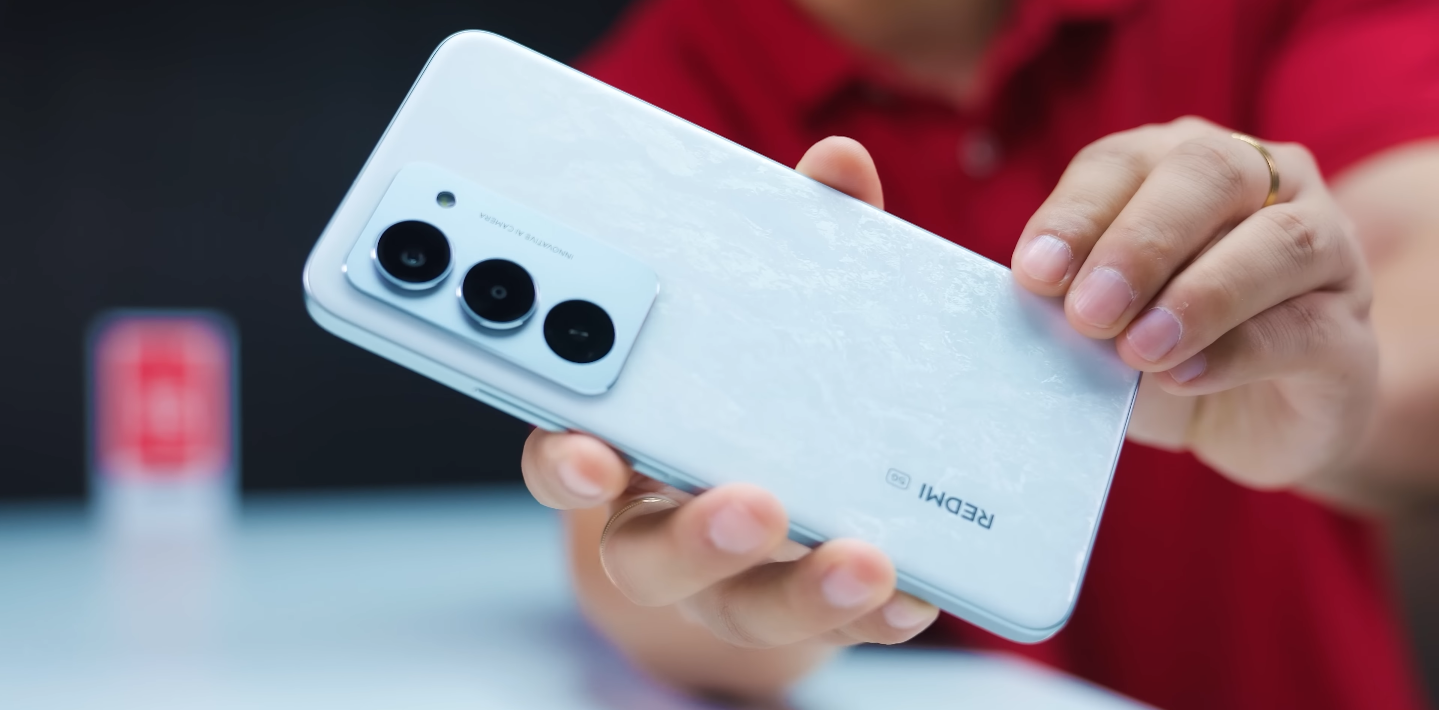

 

Redmi 15 UK service & warranty: what you should know

Redmi 15 UK service & warranty what you should know

Key service and warranty details for the Redmi 15

If you’re buying the Redmi 15 in the UK, understanding the service and warranty terms is crucial for peace of mind. Here’s what UK buyers should look out for when it comes to support, warranty coverage and after-sales service.

The warranty duration depends on where you buy the device. If you purchase from an official UK retailer or authorised channel, the device should come with a manufacturer warranty—typically 12 months for the phone itself. It’s important to make sure your receipt clearly states UK stock and the correct model.
Warranty covers manufacturing defects (screen issues, battery faults, internal hardware problems) but does not cover damage from drops, liquids or unauthorised modifications.


Service and repairs are best handled via authorised UK service centres. Buying UK-stock ensures you have local support, spare parts and valid warranty claim process. Imported or grey versions may have limited or no UK support.
When buying, check the box for UK plug (three-pin) charger and ensure the model supports UK/EU network bands—these are often different for imports or region-specific models.

Redmi 15 UK service & warranty what you should know


Maintain your proof of purchase (receipt), IMEI number and box seal. These are required when initiating a warranty claim. Without them, repair centres may refuse service or charge for out-of-warranty repair.
Software support is another key point: UK-stock devices typically receive timely OTA updates aligned with regional carriers. Non-UK variants may get delayed updates or lack local optimisations, which affects long-term usability.
Before buying: ask the retailer to confirm the model number, region code, warranty terms and whether the device is listed as “UK version” in their system. For imported units, the original warranty may only apply in the country of purchase, leaving you without local cover.


In summary: For UK buyers, going with the UK-stock Redmi 15 ensures full warranty protection, local service access and correct software/network compatibility. While the specifications and value are excellent, the service and support experience matter for long-term satisfaction.

Redmi 15 vs Sony Xperia compact budget: big screen vs small form-factor

Redmi 15 vs Sony Xperia compact budget big screen vs small form-factor

Two contrasting smartphone philosophies—large display or compact design?

When choosing a phone, size and form factor matter as much as specs. On one hand you have the Redmi 15 with a large 6.9″ display, huge battery, and value pricing. On the other hand, a compact “budget” model from Sony (in the Xperia Compact style) prioritises portability and one-hand use, typically at a higher cost or with older internals. For UK buyers weighing these options, this article explores both approaches and helps determine which makes more sense for your lifestyle and priorities.

The Redmi 15 offers a bold large screen that’s excellent for media, gaming, reading and multitasking. Its big battery supports longer use, and the value proposition is strong for users who want more display and endurance for less money. In contrast, Sony’s compact design emphasises minimal footprint, easy one-hand use, lighter carry, and better pocket fit—qualities especially relevant for commuters, students or people who dislike oversized phones.

In terms of performance and features, the Redmi 15 tends to provide newer hardware for its price: high refresh display, large battery, fresh software. A compact Sony budget model may compromise on screen size, battery and perhaps top-tier internals in order to reach smaller dimensions. That means you might pay more for less in screen size or specs—but gain in ease of handling and comfort.

Redmi 15 vs Sony Xperia compact budget big screen vs small form-factor

Trade-offs are clear. With the Redmi 15 you might sacrifice portability—a large device means more bulk, tougher to use single-handed, and may feel unwieldy in smaller pockets or bags. With a compact Sony-style phone you sacrifice screen real estate, possibly battery life or spec headroom, and for the same money you might get less “value” in terms of features per pound.

For UK usage, the decision comes down to how you use the phone. If you spend time consuming media, reading, editing, gaming or multitasking, then the large screen of the Redmi 15 will enhance your experience. If you carry the phone in tight spaces, use one-hand operation frequently, or prefer a lighter, more discreet device, then the compact size option from Sony (or similar) will delight you more.

My recommendation: for most users seeking maximum value and screen space, the Redmi 15 is the smarter buy. For users who prioritise portability, one-hand comfort and compact design, then a compact Sony-style phone makes sense—just know you’re trading screen size and possibly some specs. Ultimately the smarter choice is the one that fits how you use your phone day to day.

Redmi 15 vs iPhone 13 mini: specs vs size vs value

Redmi 15 vs iPhone 13 mini specs vs size vs value

Two very different phones aiming at two very different buyers

Comparing the Redmi 15 with the iPhone 13 mini highlights just how far apart two smartphones can be in design philosophy. One is an ultra-budget Android model built around size, battery life and value; the other is a compact premium device aimed at users who want performance and portability. For UK buyers, the decision often comes down to what matters more: big-screen practicality or small-phone convenience.

The most obvious difference is size. The iPhone 13 mini remains one of the smallest premium smartphones available, with a 5.4-inch OLED display and lightweight build that fits easily into one hand or a small pocket. The Redmi 15 sits at the opposite extreme with a much larger 6.9-inch screen, making it better for watching video, browsing and gaming. It is far less pocket-friendly, but much more comfortable for extended content consumption.

Performance is another key divider. Apple’s A15 Bionic processor inside the iPhone 13 mini remains strong even years after launch, offering high-end speed and stability with consistent software optimisation. The Redmi 15 uses a budget-to-mid-chipset designed for everyday tasks; it handles normal use easily but isn’t built for heavy gaming or professional workloads. Users looking for longevity and reliable power will lean toward the iPhone.

Redmi 15 vs iPhone 13 mini specs vs size vs value

Battery life, however, favours the Redmi 15. Its massive battery offers very long endurance, often lasting far beyond a full day of heavy use. The iPhone 13 mini’s small physical size limits battery capacity, meaning users with long days or intensive usage habits may need mid-day top-ups. Apple’s efficiency helps, but physics still wins: a bigger phone can hold a bigger battery.

The camera experience also differs. The iPhone 13 mini’s dual-lens system delivers better low-light performance, more consistent colour science and stronger video quality. For users posting frequently on social media or capturing important moments, it offers more polished results. The Redmi 15 takes good photos for its class, especially in daylight, but lacks the refinements and extra lens versatility found on Apple’s older flagship models.

Software and longevity strongly favour Apple. The iPhone 13 mini benefits from several more years of iOS updates, giving it long-term security, stability and resale value. Xiaomi provides decent support for the Redmi 15, but budget Android models typically receive fewer major updates. For buyers who keep a phone for three years or more, this becomes a major consideration.

Value, however, is where the Redmi 15 excels. It offers a large display, long battery life and capable daily performance at a fraction of the cost of an iPhone. For students or budget-conscious users, the Redmi 15 provides more features per pound spent, even if the experience is not as refined. The iPhone 13 mini, despite offering premium quality, carries a higher price that some users may struggle to justify for a smaller screen and shorter battery life.

Choosing between these two devices ultimately depends on your lifestyle. If you want a compact, fast and long-lasting premium phone with excellent camera performance and years of updates, the iPhone 13 mini is the smarter buy. If you prefer a huge screen, exceptional battery endurance and unbeatable value, the Redmi 15 clearly wins. Both devices make sense—but for entirely different reasons.

In summary, the Redmi 15 shines as a budget powerhouse built for everyday practicality, while the iPhone 13 mini remains unmatched in compact premium performance. For UK buyers seeking value above all else, the Redmi 15 stands out. For those wanting reliability, portability and software longevity, the iPhone 13 mini continues to be the superior long-term choice.

Redmi 15 UK launch stock warnings: what if you wait?

Redmi 15 UK launch stock warnings what if you wait

Should you buy now or hold off for a better moment?

The UK launch of the Redmi 15 has drawn attention for its aggressive pricing and strong feature set, but the timing of your purchase could make a real difference. Stock patterns for budget Xiaomi releases often follow predictable trends, and buyers who wait too long sometimes face higher prices or limited availability. Understanding what happens if you delay the purchase can help you avoid missing out on the best value.

At launch, retailers usually carry limited introductory stock, especially for lower-cost models aimed at quick demand. This means the first batches often sell out faster than many buyers expect. When stock runs low, prices sometimes rise as discounts expire or as retailers adjust to increased demand. If you delay too long, you may also find only higher-capacity or less-preferred variants remaining, which may not match your original budget.

Another important factor is launch pricing. Xiaomi typically uses early-bird pricing to attract attention, and the Redmi 15 follows the same pattern. These offers tend to be temporary, sometimes lasting only days or a week. Once the introductory period ends, prices return to their usual levels, which can be noticeably higher. For budget-focused shoppers, missing the launch window often means paying more for the same device later.

Redmi 15 UK launch stock warnings what if you wait

However, buying immediately is not without its own considerations. Early units sometimes arrive before the first major software updates, meaning the initial buyers experience minor bugs or optimisations that get fixed later. Waiting a short time can give early reviewers the chance to test the device, allowing you to make a more informed decision. It also ensures that any early firmware issues are patched before you buy.

One overlooked risk of waiting too long is the stock mix that appears later. Sometimes only imported or non-UK variants remain available from secondary sellers. These may lack proper UK charging standards, network certification or warranty support. Buying during the initial wave helps ensure you receive a proper UK model with full local warranty and software support tailored to the region.

On the other hand, buyers who wait several months may eventually see slight discounts from certain retailers once the initial demand cools. This is more common when a model remains widely available and competition from newer releases increases. But these discounts are not guaranteed, and they often arrive after a long wait, making them less appealing for buyers who need a phone soon.

If availability drops sharply after launch, the used and refurbished market may become more active, but early pricing in that market can be inconsistent. Some sellers raise prices when new stock is limited, reducing the benefit of waiting. Others may offer worn or imported units that lack UK support. For most buyers, relying on the secondary market shortly after launch is riskier than buying new during the initial sale.

Ultimately, the decision comes down to how sensitive you are to price and timing. If the launch price fits your budget and the Redmi 15 matches your needs, purchasing early offers the safest value. You avoid stock shortages, price increases and less-desirable variants. If you prefer to wait for reviews or firmware updates, a short wait of one to two weeks may offer improvements without risking the biggest price changes.

In summary, waiting too long after the UK launch of the Redmi 15 may mean higher prices, reduced stock, or fewer UK-specific models remaining. Buying early secures the launch price and full warranty benefits, while waiting briefly can help you avoid early software issues. The best approach is to decide quickly based on your needs, as the strongest deals tend to appear at launch and fade rapidly once early stock runs out.

Redmi 15 photography for social media: portrait & night mode test

Redmi 15 photography for social media portrait & night mode test

How well the camera performs for everyday social-ready shots

The Redmi 15 has become a popular option for users who want a budget-friendly phone capable of producing social-media-ready photos without heavy editing. Its main camera is designed to perform reliably in everyday scenarios, and for many people portrait shots and night-time photos are the biggest test of a phone’s true capability. This breakdown looks at how it handles both situations and whether the results are good enough for platforms like Instagram, TikTok and Snapchat.

In portrait mode, the Redmi 15 performs well for its segment. The primary sensor captures good detail in daylight, and skin tones appear natural enough for social sharing. Subjects tend to stand out clearly when lighting is favourable, and the phone applies background blur in a way that gives images a more polished look than a standard snapshot. For casual photography with friends or simple lifestyle posts, the portraits are more than adequate.

Despite this, the portrait mode does reveal typical budget-phone limitations. The edge detection around hair, glasses and textured backgrounds is not always perfect, and the focus separation can sometimes appear uneven. The depth effect occasionally looks artificial when the scene is complex. However, these issues are minor for most users and rarely noticeable once images are resized or filtered for social platforms.

Redmi 15 photography for social media portrait & night mode test

Night mode presents a more challenging environment, yet the Redmi 15 manages to produce usable results. In low-light scenes, the phone brightens subjects effectively and maintains enough clarity to make photos shareable. Street lighting, indoor evening settings and nightlife environments come through with acceptable detail. These images work well for story posts and casual snapshots taken on evenings out.

The limitations of the sensor become more noticeable as lighting worsens. In very dark scenes, the Redmi 15 introduces noise and a softer appearance. Dynamic range is more limited, meaning bright lights can appear blown out while darker areas lose detail. Still, with moderate lighting the phone produces night photos that look fine once compressed for social media.

Good technique helps maximise results. Keeping the phone stable during night shots reduces blur and increases clarity. Using available light sources such as shop fronts or street lamps improves sharpness. For portrait mode, stepping slightly away from backgrounds or shooting in natural light enhances the blur effect and gives the camera more contrast to work with. These small adjustments ensure more consistent photos.

When editing for social platforms, the Redmi 15’s images respond well to light colour correction, sharpening and contrast adjustments. Most users apply filters on TikTok or Instagram anyway, making the phone’s output more than suitable. Because the main sensor captures decent base detail, simple edits can elevate the images without introducing harsh artefacts.

For influencers, content creators or users who demand professional-grade results, the Redmi 15 may not offer the advanced dynamic range or low-light performance found in higher-tier phones. But for everyday social posting, the camera performs strongly within its class. It strikes a balance between affordability and capability that suits students, casual users and anyone who enjoys sharing quick moments online.

Battery life also plays a role in social photography sessions. The Redmi 15’s large battery allows extended shooting without worrying about the phone dying mid-event. This makes it suitable for festivals, day trips and long nights out where many photos and videos are captured across the day.

Overall, the Redmi 15 delivers good portrait performance and decent night-mode results that are reliable for social media use. Its strengths show most clearly in well-lit shots, but even in dim environments it remains functional and capable of producing shareable images. The phone’s limitations are expected for its category, yet its output consistently meets the needs of typical social-media users.

In conclusion, for someone seeking a budget device that can handle portraits and night shots well enough for everyday online sharing, the Redmi 15 is a strong option. It offers solid results for its price, and with small adjustments and basic editing, it can create images that look polished and ready for posting across all major social apps.

Redmi K90 Pro Max hidden UI features: gestures, AI modes and shortcuts

Redmi K90 Pro Max hidden UI features: gestures, AI modes and shortcuts

Exploring the smart tricks inside Xiaomi’s HyperOS

The Redmi K90 Pro Max doesn’t just impress with raw performance — its software experience is equally refined. Running on Xiaomi’s latest HyperOS, the phone hides a variety of smart gestures, AI modes, and productivity shortcuts designed to make daily tasks faster and more fluid. Many of these features are tucked away in the settings, but once activated, they transform how the device feels in everyday use.

One of the most practical hidden tools is gesture control. Users can double-tap the back of the phone to trigger quick actions such as taking a screenshot, launching the camera, or opening the assistant. The power button can also be remapped — a double press can instantly open any app you choose, while a long press on the fingerprint sensor can unlock the phone and simultaneously start a pre-set shortcut.

Multitasking is another area where HyperOS quietly excels. The Redmi K90 Pro Max allows apps to open as floating windows, giving users the flexibility to chat, browse, and watch videos all at once. A swipe gesture from the corner of the screen brings up a quick access bar, letting you drag apps into split-screen mode or pop them out for temporary use. These tools are especially handy for productivity or multitasking-heavy users.

Redmi K90 Pro Max hidden UI features: gestures, AI modes and shortcuts

Xiaomi’s AI integration in HyperOS takes personalisation to a deeper level. The system learns your usage patterns and begins predicting actions — such as launching your fitness app in the morning or pulling up navigation when you’re leaving home. Over time, this adaptive AI reduces manual navigation and helps the phone feel faster and more intuitive.

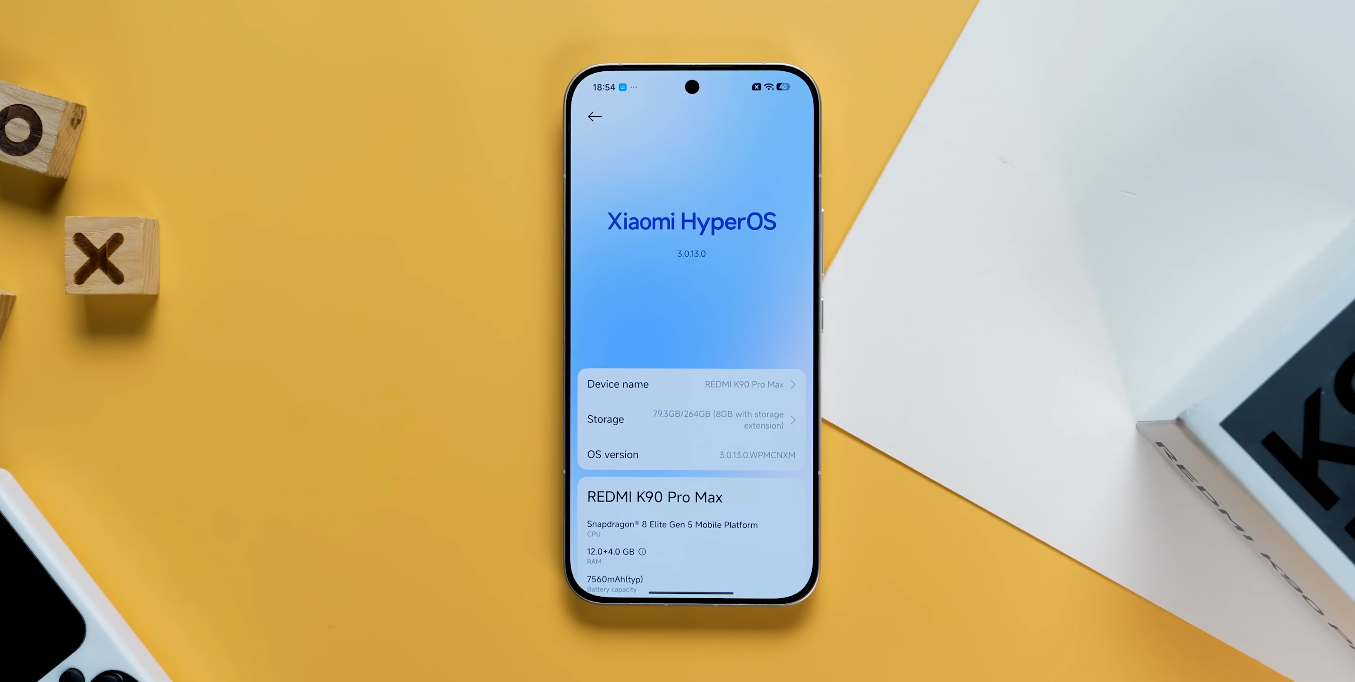
Another useful addition is Memory Extension, which converts a portion of storage into virtual RAM. This means the K90 Pro Max can keep more apps running in the background without slowdowns, enhancing performance for multitaskers and gamers alike. It’s one of those quietly effective features that makes the user experience smoother over months of use.

For visual customisation, HyperOS gives users deep control. You can rearrange the control centre layout, group apps by colour, or add animated widgets to the home screen. The always-on display now supports custom text, graphics, and AI-powered dynamic wallpapers that adjust based on time of day and weather. The system even offers granular theme settings, allowing users to sync wallpapers with UI accents for a more polished look.

HyperOS also introduces new quick shortcuts for convenience. You can swipe down on the home screen to open notifications instead of search, or enable one-handed mode with a simple diagonal swipe. For outdoor use, the “Sunlight Mode” automatically boosts display brightness beyond the regular limit when strong light is detected — an underrated but genuinely useful feature for UK users dealing with unpredictable weather.

Another hidden tool is the “Smart Toolbox,” a side-mounted floating bar similar to Samsung’s Edge Panel. It allows instant access to favourite apps, contacts, and quick settings. You can summon it with a swipe from the side of the screen while in any app, a subtle addition that greatly improves workflow efficiency.

In terms of deeper system tweaks, Xiaomi includes diagnostic codes like ##6484## for testing sensors, touch input, and hardware components — useful for advanced users but best handled with caution. These hidden menus demonstrate how comprehensive Xiaomi’s software layer has become.

Altogether, the Redmi K90 Pro Max offers more than just a polished interface — it delivers a feature-rich experience tailored to modern users. Once you explore its hidden gestures, AI enhancements, and smart shortcuts, HyperOS reveals itself as one of the most capable and intelligent Android skins on the market. For UK users seeking both power and personalisation, this flagship’s interface stands out as a true highlight.

Redmi K90 Pro Max performance benchmarks: Snapdragon 8 Elite Gen 5 in real life

Redmi K90 Pro Max performance benchmarks Snapdragon 8 Elite Gen 5 in real life

How Redmi K90 Pro Max performs under real-world conditions

The Redmi K90 Pro Max is powered by Qualcomm’s Snapdragon 8 Elite Gen 5, a processor that defines the next generation of mobile performance. Xiaomi’s new flagship has already drawn attention for scoring impressively in synthetic benchmarks, but what matters more is how it performs in real life. Early reviews and test data give a clear picture of where it stands among today’s top-tier smartphones.

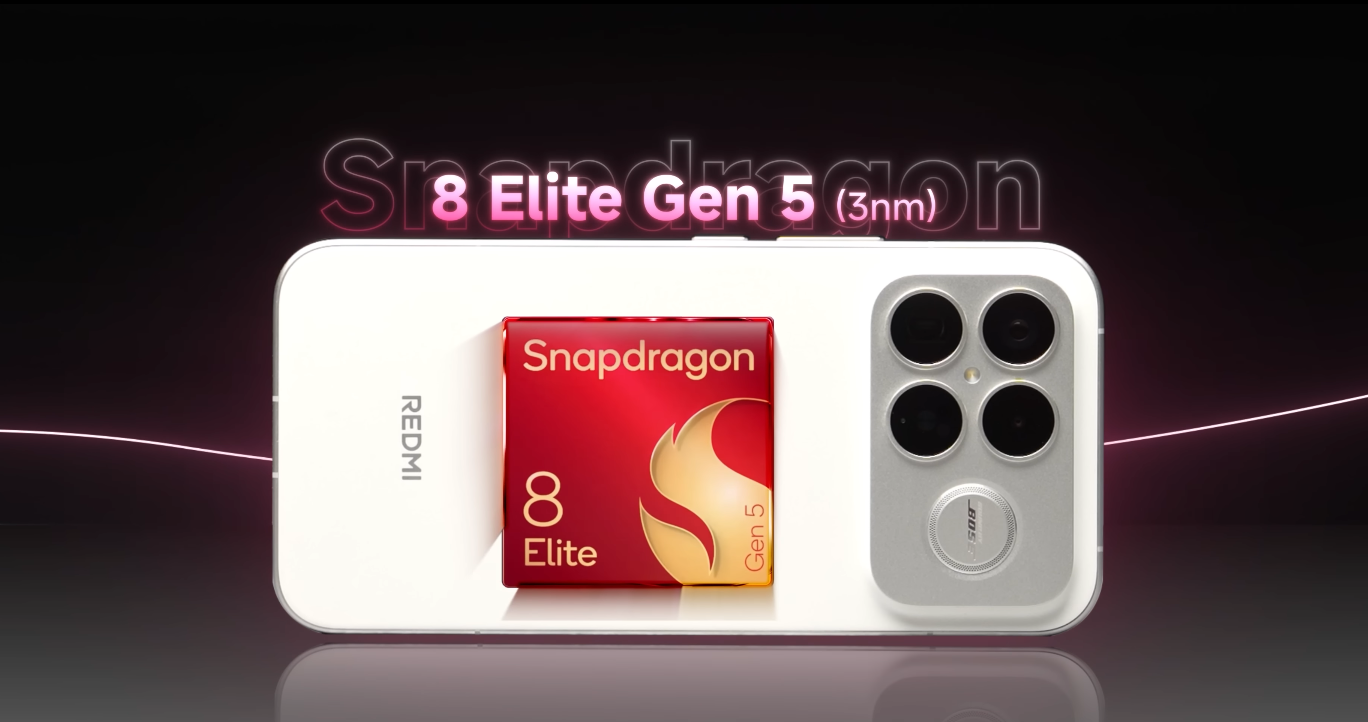
On paper, the Snapdragon 8 Elite Gen 5 is built on a 3nm process, offering a balance between raw power and energy efficiency. In benchmark tests, the K90 Pro Max achieved around 3,700 points in Geekbench single-core and over 11,000 in multi-core performance. These results place it directly alongside the best-performing Android devices available, including those from Samsung and OnePlus.

AnTuTu scores near 3.8 million confirm its flagship-grade credentials. These figures translate into ultra-smooth operation, minimal app loading times, and lightning-fast response even during intensive use. Whether users are multitasking, gaming, or streaming, the K90 Pro Max consistently performs without lag or stutter.

Redmi K90 Pro Max performance benchmarks Snapdragon 8 Elite Gen 5 in real life

The phone’s GPU, an Adreno-based unit integrated into the Elite Gen 5 platform, handles gaming exceptionally well. In extended play sessions of titles like Genshin Impact and Call of Duty: Mobile, frame rates remain stable and sustained. Xiaomi’s improved cooling system helps maintain performance during long sessions, reducing the kind of thermal throttling that affects many premium phones.

In everyday use, the K90 Pro Max feels as fluid as it benchmarks suggest. Switching between heavy applications, rendering videos, or editing 4K clips doesn’t slow it down. HyperOS also optimises RAM allocation and storage access to ensure consistent speed, even under load. For most users in the UK, this translates to top-tier responsiveness for years to come.

Battery efficiency is another standout. Thanks to the 3nm architecture, power consumption is significantly reduced under high performance. Users report impressive endurance during gaming, video recording, and general use. Combined with its large battery, the phone maintains power longer than many rivals, making it as practical as it is powerful.

Under sustained workloads, the K90 Pro Max’s temperature control remains commendable. Even after extended testing, the device rarely exceeds moderate warmth. Xiaomi’s vapour cooling system and adaptive performance management play a major role here, allowing the Snapdragon 8 Elite Gen 5 to sustain its high clock speeds without compromise.

In productivity tasks, the results are equally impressive. Apps open instantly, large files transfer within seconds, and background processes run seamlessly. Benchmark platforms like PCMark rate it among the highest in work performance, meaning users can rely on it for professional workloads as well as entertainment.

Compared to its direct rivals such as the Galaxy S25 Ultra or Xiaomi 17 Pro Max, the Redmi K90 Pro Max offers nearly identical benchmark performance at a significantly lower price. It may lack certain software refinements or premium materials, but its internal performance makes it a true flagship competitor.

For UK consumers, the K90 Pro Max’s benchmark numbers accurately reflect its real-life experience. It is fast, stable, and efficient across all tasks. Whether used for gaming, content creation, or daily productivity, the Snapdragon 8 Elite Gen 5 proves itself as a powerhouse that delivers flagship performance without compromise.

In the end, the Redmi K90 Pro Max demonstrates that benchmark scores can indeed mirror real-world excellence. It combines raw speed, reliable thermals, and efficient power management, creating one of the most capable smartphones of 2025. For anyone seeking elite performance at a smart price, this phone stands among the best options on the market.

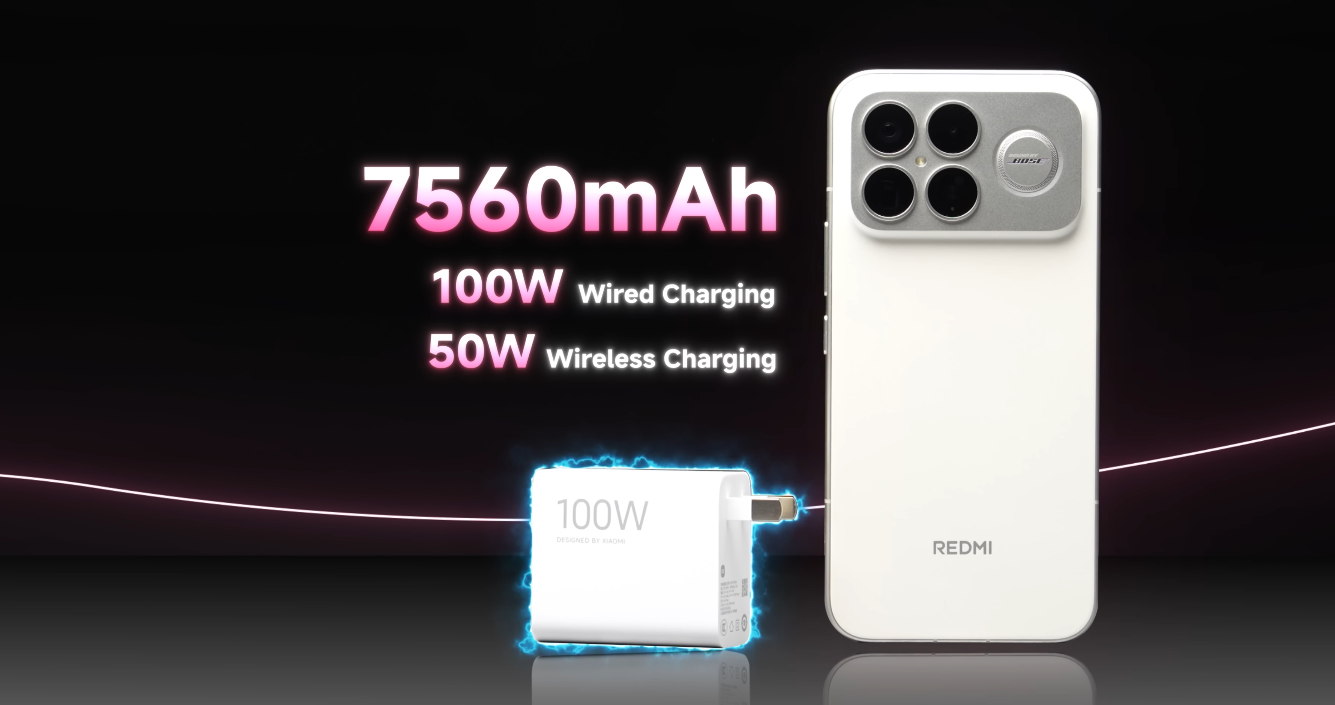
Redmi K90 Pro Max battery life confirmed at huge 7,560 mAh — real-world results

Redmi K90 Pro Max battery life confirmed at huge 7,560 mAh — real-world results

A closer look at endurance and daily performance

The Redmi K90 Pro Max has attracted considerable attention due to its exceptionally large 7,560 mAh battery capacity, which positions it among the highest-capacity batteries in mainstream flagship smartphones. This specification alone suggests a strong focus on lasting performance, and recent real-world usage reports indicate that the device is prepared to deliver extended endurance for everyday tasks. The battery size is particularly notable given the powerful hardware and large display that the phone supports.

The device is equipped with a high-performance chipset and a sizeable AMOLED display with a high refresh rate, both of which typically require a considerable amount of power. However, efficiency improvements in modern processors and display tuning have helped ensure that the larger battery translates to longer real-world use, rather than being consumed rapidly by high-end features. This allows the phone to balance top-level performance with dependable endurance.

In daily mixed usage, such as browsing, messaging, video playback and occasional navigation, the battery has shown the ability to comfortably last a full day for most users, often extending into a second day with moderate usage patterns. This outcome aligns with expectations based on the battery’s size and the phone’s power management features. Users who rely on their phones throughout the day without constant charger access should find this especially reassuring.

Redmi K90 Pro Max battery life confirmed at huge 7,560 mAh — real-world results

The battery performance also holds up competitively during more demanding scenarios. Tasks like extended gaming, 4K video recording, or continuous use of high brightness levels will reduce runtime more quickly, but the Redmi K90 Pro Max remains capable of offering strong endurance even under heavier loads. The efficiency of the chipset and cooling design helps sustain performance without excessive battery drain.

Charging capabilities further enhance the overall battery experience. The phone supports fast wired charging, which allows the large battery to replenish noticeably faster than would be expected from its capacity alone. In addition, wireless charging support adds flexibility, making it convenient to top up the battery throughout the day. This combination of speed and convenience minimises downtime, even for users who push their device extensively.

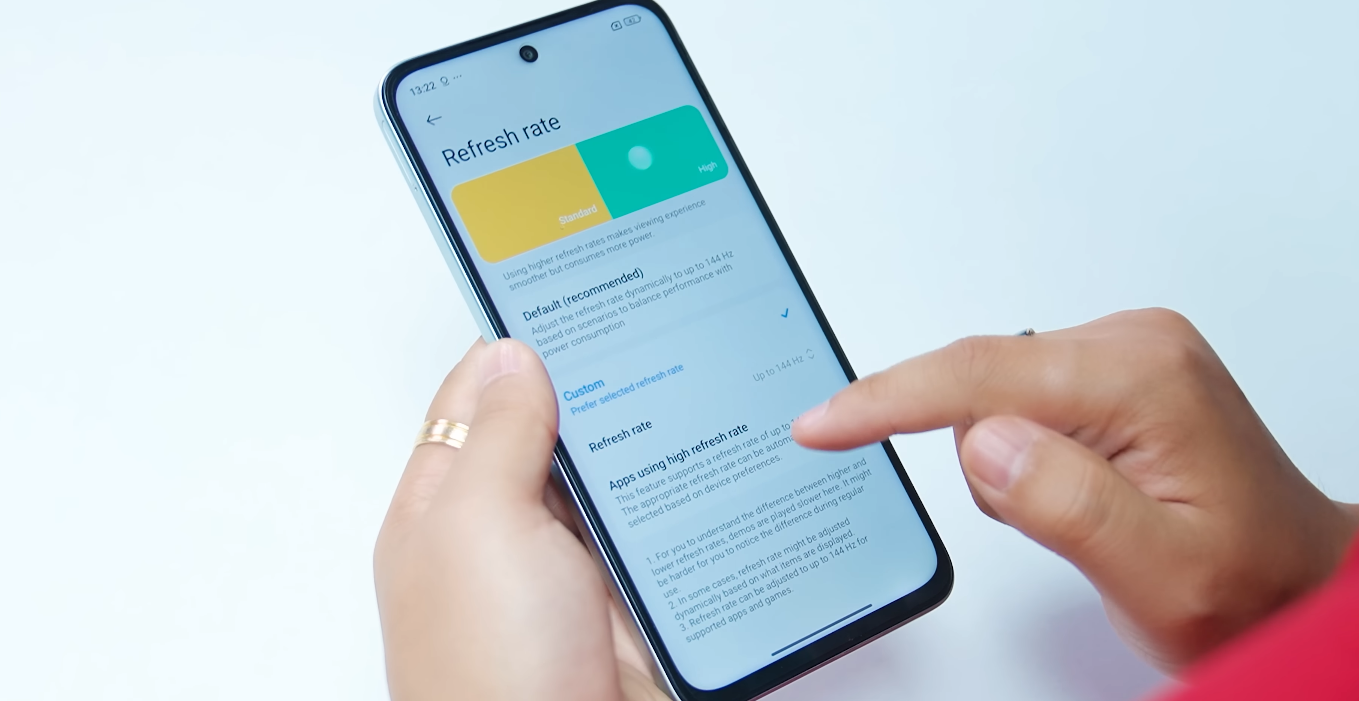
The phone’s large display is a key contributor to power consumption, especially when using higher refresh rates or maximum brightness. However, battery management options allow users to adjust settings based on preference, balancing performance with endurance. Features that regulate refresh rate and optimise background processes are particularly helpful in extending runtime without requiring constant manual adjustments.

For UK users, where outdoor lighting conditions range widely across the year, the display’s peak brightness capability is especially useful. High brightness typically increases power draw, yet the Redmi K90 Pro Max manages to maintain respectable battery stamina during outdoor use. This makes the device practical for commuters, travellers and anyone who spends extended time outside or on transport.

In scenarios where the device is used for navigation, hotspot tethering, or sustained streaming, the large battery again provides an advantage by reducing the need for mid-day charging. These are common situations where many phones struggle, particularly as battery health changes over time. The capacity here offers a buffer that should help sustain performance even as the battery undergoes natural long-term wear.

The balance between hardware performance and power efficiency is one of the strengths of the Redmi K90 Pro Max. It delivers flagship-level capability while minimising the compromises often associated with large displays and high-end components. This makes it particularly appealing to users who prioritise battery life but do not want to sacrifice advanced performance or media features.

Overall, the Redmi K90 Pro Max’s confirmed 7,560 mAh battery capacity is more than a marketing highlight. Real-world testing and daily use indicate that the device provides meaningful endurance, reducing the frequency of charging for many users. Whether used lightly throughout the day or pushed through more intense workloads, it maintains dependable performance. For those who value battery life as a core feature, this device stands out among current flagship offerings in a highly competitive smartphone landscape.

Redmi 15 screen curvature & design feel: premium or gimmick?

Redmi 15 screen curvature & design feel premium or gimmick

Examining whether the design adds genuine value or just aesthetics

The design of the Redmi 15 distinguishes itself in its segment by emphasising curved back edges and a unified “all sides” curvature, which Xiaomi claims improves hand-feel and comfort. Given the large screen size (6.9″) and budget nature, the question for UK buyers is whether these design touches are actually meaningful or primarily marketing flair. This article explores the build, ergonomics, and everyday handling to assess if the design is more than just a gimmick.

From the outset, the Redmi 15’s curved design delivers tangible comfort benefits. For such a large-screen device, the curved edges and back frame help the phone fit the palm more naturally, reducing the slab-feeling that many budget big-screen phones suffer. When holding the phone for reading, streaming or longer sessions, users report the feel is smoother than other phones in the same price bracket—an ergonomic win. The curve also helps with grip, and combined with reasonable weight distribution the phone feels less brute-force than some equivalents.

That said, the size is still large. The 6.9-inch screen dominates the device, making one-hand use challenging regardless of curvature. Even with aesthetic curves, the phone will be bulkier than compact alternatives, affecting pocket carry and single-hand reach. So while the curves help, they don’t fully compensate for the size. If you prioritise compactness and one-hand comfort, you’ll still feel the trade-off.

Redmi 15 screen curvature & design feel premium or gimmick

Material choices and finish also matter. While curved design is a premium feature, the Redmi 15 remains in the budget tier. That means materials may not match premium glass or metal back-plates, and detailing, speaker grilles, frame finish may be simpler. The curves improve feel, but they do not elevate build to high-end luxury. Buyers should note the difference if they’ve used flagship phones before.

From a UK user perspective, the design contributes genuine value in a budget phone context because it addresses comfort and usability issues typically seen in budget large phones. The curves make longer sessions of use (media viewing, browsing) more pleasant, which is meaningful given the large display. If you spend a lot of time on your phone, this improvement matters. However, if your usage is short bursts or you prioritise ultra-premium feel and compact size, the benefit is less impactful.

In summary: the design curves of the Redmi 15 are more than just a marketing trick—they improve comfort and ergonomics in a large device at a budget price. They offer real everyday benefit for users who value large screen time, streaming, reading and media. But they are not full luxury; the feel won’t match top-tier flagship finishes and the size remains significant. For UK buyers seeking the best balance between price, big display and usable comfort, the Redmi 15’s design is a definite plus; for those seeking compactness, ultra-premium build and minimal size trade-offs, it may still feel like a compromise.

Redmi 15 vs Samsung’s “budget flagship”: brand comparison

Redmi 15 vs Samsung’s “budget flagship” brand comparison

Evaluating brand trust, support and value for money

Choosing a smartphone isn’t just about specifications—it’s also about the brand behind it, the ecosystem, the long-term support and how it serves you over time. In this comparison, the Redmi 15 from Xiaomi is pitted against a representative “budget flagship” from Samsung (such as the Galaxy A-series). The question for UK buyers is: which brand-model represents the smarter investment considering value, support and future use?

The Redmi 15 offers aggressive value. Xiaomi has packed high refresh rate display, large battery capacity, decent camera hardware and feature-rich software into a budget package. For cost-conscious buyers who want as much phone as possible for their money, Xiaomi is compelling. Its focus is on delivering features rather than premium materials or ultra-long update cycles.

Samsung’s budget flagship approach is different. The brand leverages its strong reputation, established service network in the UK, better build quality and typically stronger software update commitments. A Galaxy A-series device may cost more, but it aims to provide a more premium experience with fewer compromises. That means for users wanting durability, resale value and longer-term support, Samsung often leads.

Redmi 15 vs Samsung’s “budget flagship” brand comparison

From a features-for-money perspective, the Redmi 15 wins hands-down if you simply judge specs divided by pounds spent. But from a “which phone will still feel good after two or three years” standpoint, Samsung takes the lead. The difference lies in build quality (materials, finish), display tech (AMOLED vs budget LCD), camera refinement and update lifespan.

Reliability and durability matter. Xiaomi’s budget devices are well engineered, but smaller savings in materials or certification may appear over time—lesser glass protection, plastic frames, fewer upgrades. Samsung invests more in these areas even for mid-tier models. For a buyer who uses the phone hard or expects to keep it for several years, the Samsung brand offers peace of mind.

When it comes to value, however, the Redmi 15 remains hard to beat. For students, secondary phones, travellers or users who upgrade every year or two, the extra cost of the Samsung model may not deliver proportionally more benefit. If your usage is contextual (social media, streaming, moderate apps) and you don’t mind minor trade-offs, Xiaomi is smart.

For UK buyers in particular, service and support networks are important. Samsung has guaranteed parts availability, years of software/security updates and wide service centres. Xiaomi has improved its UK coverage but may still lag slightly in update guarantees or part stock compared with Samsung. If you travel, rely on service and resale value, this becomes significant.

In conclusion: if your priority is best value right now, go Redmi 15. If your priority is long-term support, fewer compromises and stronger brand ecosystem, the Samsung budget flagship is likely the smarter buy. Your personal decision should focus on how long you expect to keep the phone, what you require from cameras and performance, and how important brand reliability is in your usage.

Redmi 15 UK eligible for student discounts: worth it?

Redmi 15 UK eligible for student discounts worth it

A clear look at student savings and real value

The Redmi 15 has become a popular choice among budget-focused buyers, and for UK students the prospect of an additional discount makes the offer even more appealing. With official student-verification schemes active in the UK, the phone is indeed eligible for reductions at checkout. This raises an important question: does the student discount make the Redmi 15 genuinely worth buying, or is it simply a small bonus on top of an average device?

In the UK, Redmi’s parent brand runs verified discount programmes that allow students to receive a price reduction once their status is confirmed. These schemes operate through recognised student-verification partners and can be applied directly on the official store. While the exact percentage varies depending on promotions, the typical figure sits around ten per cent, which is a meaningful saving on a budget-tier smartphone.

To put the discount into context, a reduction of ten per cent on a device priced in the lower-to-mid range brings the final cost down by a noticeable margin. For example, if a phone retails near two hundred pounds, the discount may save around twenty. While not transformative, it can be particularly helpful for students who need to balance essential tech purchases against tight budgets.

Redmi 15 UK eligible for student discounts worth it

The Redmi 15 itself sits comfortably in the budget segment with specifications designed for everyday use. It features a large display, long-lasting battery capacity and a dependable primary camera. The model has been marketed as a practical daily driver rather than a performance powerhouse, and this positioning is important when assessing the value of the discount. A saving is useful, but the underlying device must still meet the user’s needs.

For students whose workload centres on browsing, streaming, note-taking and frequent communication, the Redmi 15’s strengths align well. Its large battery helps it last through lectures, study sessions and commutes without frequent charging. The spacious display makes reading, researching and viewing content comfortable. These attributes ensure that the discount enhances an already sensible choice.

However, anyone expecting heavy gaming performance, professional-grade photography or long-term software headroom might find the Redmi 15 limiting. Budget devices naturally make compromises, and no discount can change their core design intentions. Students who rely on demanding apps, extended multitasking or advanced creative tools should compare higher-tier models before committing to this one.

Another benefit of purchasing through the official channel is the assurance of UK-level warranty and service. This is particularly valuable for students, as reliable after-sales support removes risks associated with repairs or manufacturing issues. Paired with the reduced price, it helps create a package that feels secure and straightforward, especially for users buying their first smartphone independently.

It is also worth considering how long the device will remain suitable. Budget phones generally have shorter software support cycles and may struggle with performance after several years of updates. For students beginning multi-year courses, it is important to think about whether the Redmi 15 will stay practical for their entire academic period. The discount lowers the cost today, but the device’s longevity still depends on its hardware capabilities.

Overall, the student discount should be treated as a bonus rather than the deciding factor. It strengthens the Redmi 15’s value, but it does not turn it into a premium device. The phone is worthwhile if its core features align with your needs, and the discount becomes the final nudge that makes the purchase feel sensible. If your expectations require more performance or longer lifespan than a budget handset can provide, the reduced price may not be enough to justify the compromise.

In conclusion, the Redmi 15 is indeed eligible for student discounts in the UK, and the savings make it a very attractive option for those seeking an affordable, reliable and straightforward smartphone. For everyday academic life and general use, the discount enhances the device’s strengths. But the decision should ultimately rest on how well the phone’s specifications match your personal study habits, lifestyle and long-term plans.