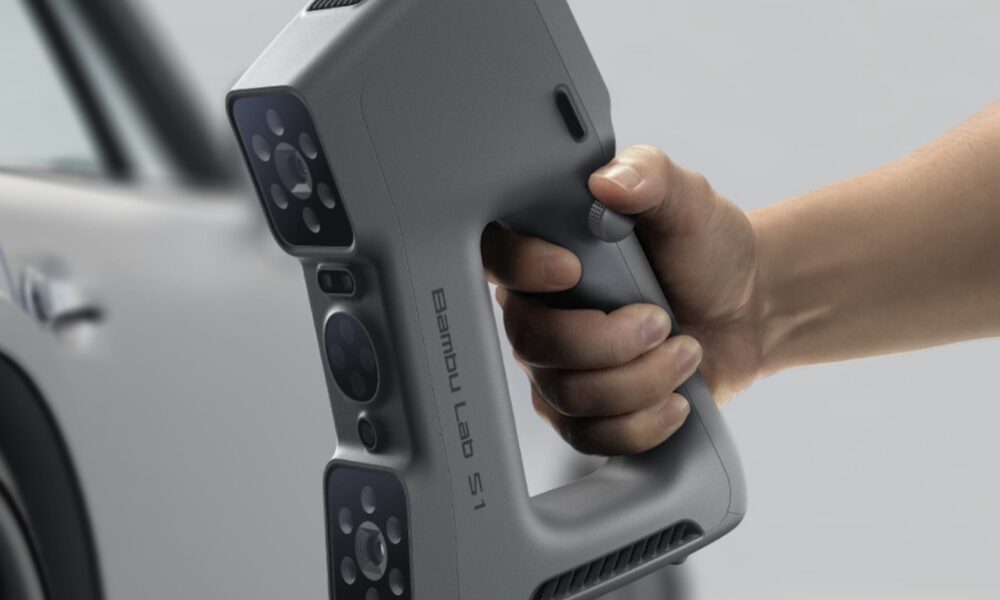
Bambu Lab S1 Wireless 3D Scanner Review Features
Introduction to Bambu Lab S1 Wireless 3D Scanner
The Bambu Lab S1 wireless 3D scanner enters the market as a beginner friendly device designed to simplify the scanning process. This compact scanner features a built in touchscreen interface and utilizes 34 laser lines to capture detailed geometry. Bambu Lab positions this product as an accessible entry point for hobbyists and professionals who want accurate results without complex workflows. The device ships fully calibrated and ready to scan within minutes of unboxing.
Key Features and Specifications
The Bambu Lab S1 wireless 3D scanner incorporates several notable features. The device includes a responsive touchscreen display that eliminates the need for an external computer during initial setup and scanning. Thirty four laser lines project structured light patterns onto objects enabling the scanner to capture surface detail with precision. Wireless connectivity allows users to operate the scanner untethered from a workstation. The scanner supports both turntable and handheld scanning modes providing flexibility for different object sizes.
Accuracy specifications indicate the Bambu Lab S1 can achieve results suitable for reverse engineering, quality inspection, and digital archiving. Built in algorithms handle alignment and mesh generation automatically reducing the learning curve for new users. The scanner captures color texture alongside geometry enabling full color 3D models ready for visualization or printing. A rechargeable battery provides up to two hours of continuous scanning per charge.
Integration with Bambu Studio
Seamless integration with Bambu Studio represents a major advantage of the Bambu Lab S1 wireless 3D scanner. Bambu Studio serves as the companion software for Bambu Lab 3D printers including the Bambu Lab X1 Carbon, Bambu Lab P1P, and Bambu Lab A1 Mini. Scanned models can be imported directly into Bambu Studio for editing, slicing, and printing without file conversion steps. This workflow integration means users can scan an object, refine the mesh in Bambu Studio, and send it to a Bambu Lab 3D printer within a single software environment.
The software includes tools for hole filling, mesh simplification, and support generation tailored for additive manufacturing. Automatic orientation suggestions optimize print quality while minimizing support material. Users can also export standard formats like STL, OBJ, and PLY for use in other CAD or slicing applications.
Ease of Use for Beginners
Bambu Lab designed the S1 wireless 3D scanner with beginners in mind. The touchscreen interface guides users through calibration, scanning mode selection, and preview functions. Visual indicators show scanning coverage in real time helping operators identify gaps before finalizing a scan. Automatic exposure adjustment adapts to different surface colors and reflectivity reducing failed scans. The interface displays helpful prompts when the scanner detects challenging conditions such as transparent or highly reflective surfaces.
Documentation and tutorial videos provided by Bambu Lab cover common scenarios including scanning small parts, large objects, and reflective surfaces. The Bambu Lab community forum offers additional support from experienced users who share tips for challenging materials. Firmware updates deliver new features and improvements over wireless connection without requiring a computer.
Comparison with Other Entry Level Scanners
When compared to alternatives like the Revopoint MIRACO, Creality CR Scan Ferret, and Einstar 3D scanner, the Bambu Lab S1 wireless 3D scanner distinguishes itself through the Bambu Studio ecosystem integration. While competitors may offer similar hardware specifications, the direct pipeline to Bambu Lab 3D printers creates a streamlined scan to print workflow. The touchscreen interface also sets it apart from scanners that require a smartphone or laptop for operation. Price positioning makes it competitive with other mid range consumer scanners while offering superior software integration.
Pricing and Availability
The Bambu Lab S1 wireless 3D scanner is available now through the official Bambu Lab store and authorized retailers worldwide. Pricing positions it in the mid range consumer segment making it accessible to serious hobbyists and small businesses. Bundle options may include a motorized turntable, calibration board, and protective carrying case depending on the retailer. Regional pricing varies based on local taxes and import duties.
Final Thoughts
The Bambu Lab S1 wireless 3D scanner delivers a compelling package for users entering 3D scanning. Its combination of wireless operation, touchscreen control, 34 laser lines, and Bambu Studio integration addresses common pain points in the scanning workflow. For owners of Bambu Lab 3D printers, the ecosystem synergy adds significant value. Beginners will appreciate the guided interface while experienced users can leverage the accuracy for professional applications. The scanner represents a thoughtful evolution of consumer 3D scanning technology focused on accessibility and results.