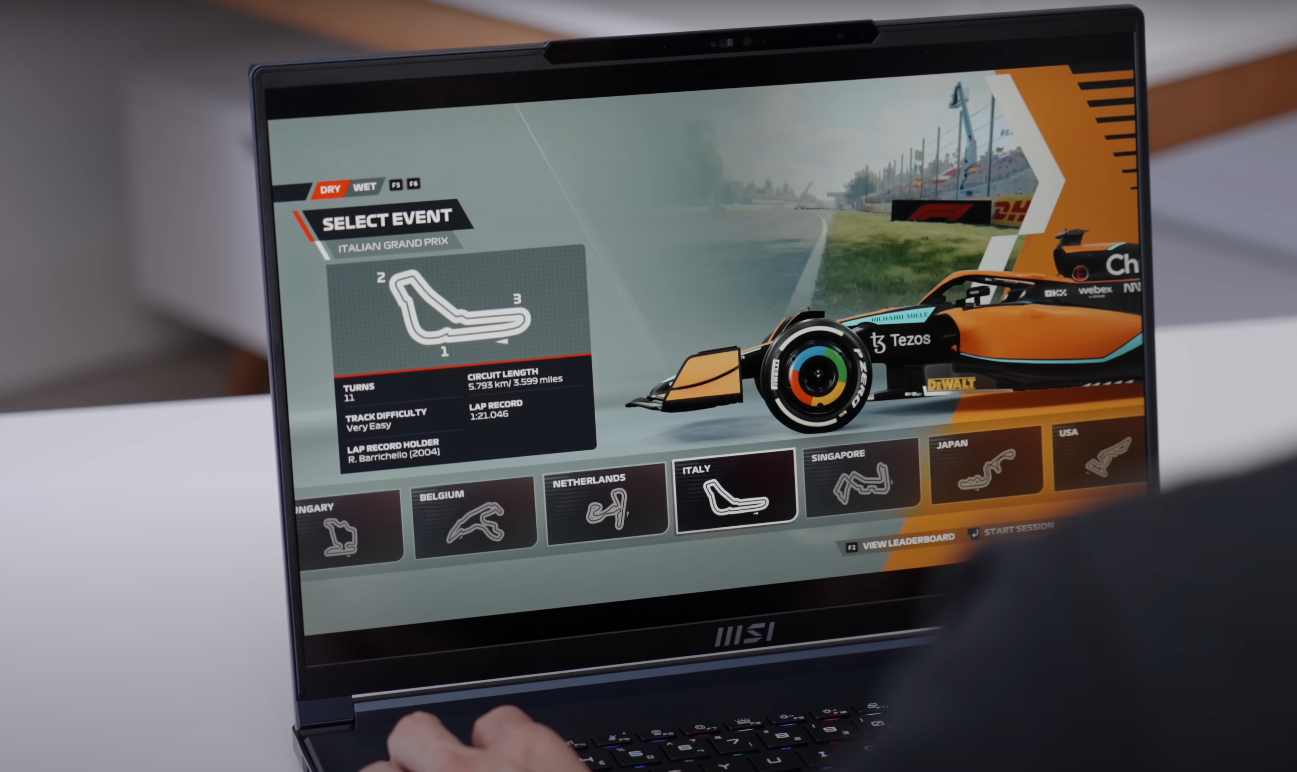
We played many games like bgmi, free fire, call of duty, gta 5 on this laptop. We tried to play many games here in low and high settings and the result we got is what we are going to cover in this blog today.
First of all we tried BGMI, FREE FIRE
We tested BGMI on ultra settings. We were getting okay FPS in raw performance, around 3540. But if you apply frame generation there, then you get an average of 80 FPS. Then FREE FIRE is a very demanding game. Even after applying frame generation, I could not get good frame rates here in this laptop and I did not find anything good in raw performance, but raytracing is very hyped here.
If you tweak the settings, you will definitely be able to play. I am telling you the maximum, which we keep in every laptop. Scenario so that you do not have any problem in comparing. Then The Last of Us to Raw performance is not so good playable. Average 40fps was coming out. Meaning you can play. But if you want good frame rate then you can easily get 70, 80, 90 FPS by applying frame generation.
Horizon Forbidden, Spiderman to game khelne ke bad is laptop ke FPS
Tested Horizon Forbidden on West Very Icings, applying DLAs frame generation, it is able to get up to 60 FPS. Normally also it is 40 45. After that Ghost of Tsushima gives good frame rate. Like in raw performance also we are getting playable 45 50 fpfs. By applying frame generation, it is up to 90. Helple 2 is a very demanding game. And here the raw performance is 30 FPS. The playable frame rate was not that good. But as soon as frame generation was applied, good FPS were obtained, like around 80.
Then Blackout working test was done on Cinematic i.e. highest possible settings. In this, playable FPS was obtained by applying frame generation. Raw performance was not playable. Even if we apply rate setting on very high, the raw performance is poor. Here you can play only by applying frame generation. And that too is being tested on 1600p. If you want, you can also get good frame rate by reducing the resolution.
After that, Spiderman 2 was tested.
Raw performance was not good. I was able to get 30 FPS. But by applying frame generation, we were easily getting our average of 55 60 70 FPS. And if we put the rate racing on very high, then the raw performance is completely gone. And here in Alan Wake 2, the raw performance was not good on high settings.
By applying frame generation, we got playable FPS but with rate racing off. If we put rate racing on ultra, then raw is also gone and even after applying frame generation, it is gone. So here if I conclude the gaming performance of the laptop, if you actually think that I should buy it for gaming, then no. It is not targeting gamers. It targets the portable factor in which you can also do gaming casually. So hopefully you must have understood.
Although the laptop is full of ports, but I felt a small lack
Here we will get a combo of headphone mic jack on the right side. There is a Thunderbolt Four port which also supports 100 watt PD. You can also take fast speed data transfer and DP 1.4 i.e. display output. But from the iGPU you will get output from Intel Arc graphics. Not from Nvidia graphics.
Then we have USB 3.2 Type A. The A port is a power input port. And this is a reversible charger. You don’t need to think how to plug it. Just plug it and it plugs in from both sides. What did you say? In the charger jack. And on the left side is a USB 3.2 J2 Type C port. And with this you can get display output from the dedicated GPU. But if your laptop is on hybrid mode or discrete mode then only you get output.
If the iGPU is on only mode then obviously the GPU is off, so you don’t get output from that Type C port. And there is no power delivery support from this Type C port. But data transfer is done at a fast speed. You also get a micro SD card reader. We tried using a card up to 1 TB and it was working smoothly. Apart from that, you get an HDMI 2.1 port. RJ45 LAN port and Canginton lock.
Now you will say that brother, if there are so many ports then what is missing? There should have been one more Type A port. Because when we were using it, we found that there was only one Type A port and then it gets filled up, so you will have to either buy a Type C hub or you will miss one Type A port.
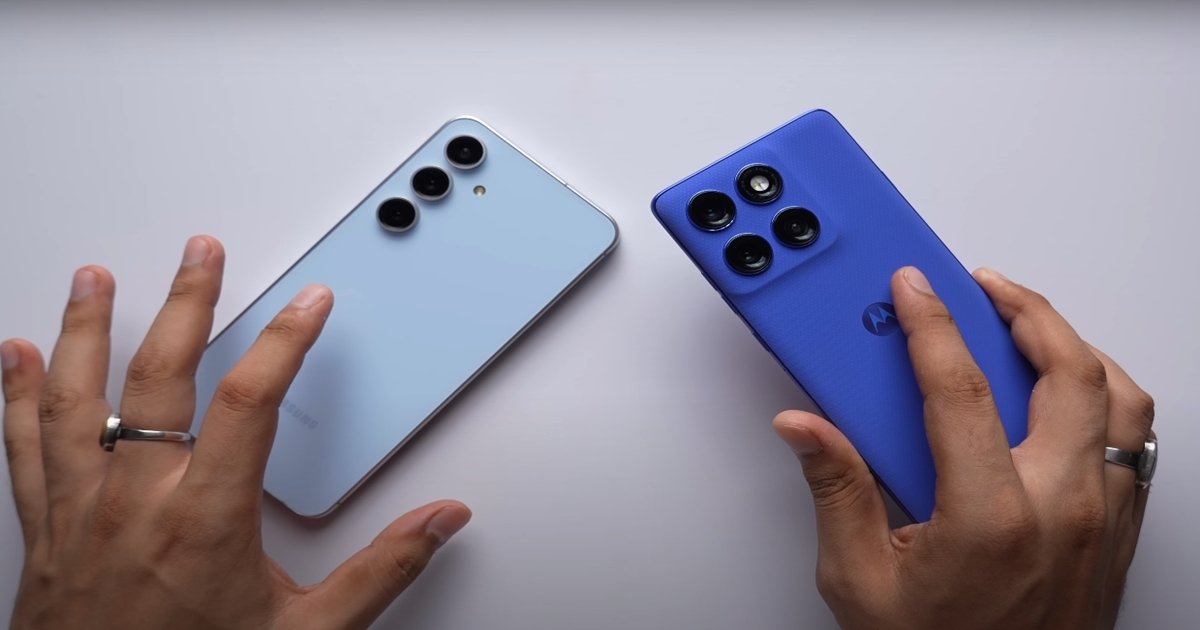
In which you also get support for videos up to 4K 30. Now even after being on 1X, Samsung is able to go very close. But if you want to go very close to the subject, shoot a big video, then that thing is possible only in S60 Pro.
Video record on 4k 30 FPS
So right now I am shooting 4K 30 FPS video from the selfie camera of both the phones. You get support for maximum resolution frame rate in S60 Pro. Whereas Samsung can shoot up to 4K 60. So here how are both the phones able to manage the dynamic range in opposite lighting. Now in videos, you get much better mic quality in Motorola compared to Samsung.
This is 1080p 60 fps videos from the selfie camera of both the phones. So first we will talk about 4K 60, 4K30, 1080p 60. In every mode, you will find Samsung’s video better. In fact, here in Motorola’s video, face having a forced shine. It is not able to control the exposure properly on my face. Guys, trust me, the difference in quality here is quite good. And in Samsung’s photo, the shape of my face is completely distorted. In fact, the difference here in portrait photos is even more. Like in colors, sharpness, noise levels. Motorola is performing much better in everything. Now Samsung can shoot up to 4K 120 which is a big deal. And Motorola’s is 1080p 120 FPS.
Motorola vs samsung
Now there is no comparison here. Samsung’s video is much better. Yes, Motorola’s video is also good if not compared to Samsung. Kind of decent. And this is the dual video recording mode of both the phones in which you can shoot video simultaneously from both the front and back camera. In fact, see the difference in 3X, how much sharper is Motorola’s photo. How low are the noise levels.
You can see the rest of the low light selfies. Whose photo do you like more, I leave it totally to you. Now, just like daytime, in night time also, you will find the ultrawide camera video sharper in Motorola. On the other hand, see how much better Motorola’s photo looks. And in Samsung’s photo, my face looks exactly like an oil painting.
HDR performance and stabilization
Now here I think you get better stabilization in Samsung. Along with this, exposure control, HDR performance is also better in Samsung’s video. But trust me, here I have to say that Motorola has given a very good competition to Samsung. And as soon as we talk about low light photos. So here Samsung is not able to perform very well in terms of quality. Like at 1X, 2X. It is not able to preserve the details at all.
Samsung’s video is soft but you get more noise levels in Motorola’s video. Due to auto focus in this, you also get to see some focus hunting issues in extreme low light. Still, Motorola is recommended here due to better sharpness. And as soon as we talk about 1X, you will find Samsung’s performance slightly better here. And at 1x, somewhere Motorola loses details and sharpness in videos in low light.
In fact, even at 3X Moto is performing better like colors, skin tones, everything. So Samsung has set an approach here that keep the face more bright in the photo. It will look good. But obviously brightening the face is not everything. As for the rest, if we talk about 2X, 3X, then in that case you will not find much difference.
Shooting videos in low light with the selfie camera of both the phones
In Samsung, you will see that it seems like the entire frame is completely engulfed in smoke. Motorola has balanced everything very well here. So, especially here, the light control in low light, in photos and videos, I find Motorola S60 Pro better. Along with this, here you can see that even in opposite lighting, the S60 Pro is able to manage skin tones, colors and exposure in the background very well.
After moving a little away from the light, you will see that here in Motorola’s video, the noise levels in the sky are a little high. But Samsung has loosened its sharpness to a great extent. So both the videos are not perfect. But here you will get better quality of S60 Pro in low light.
Now, no one is going to shoot a video in such darkness. But I was testing. Here you can see in Samsung’s video. This scene is really very scary. I don’t know what kind of weird effect has come here in Samsung’s video. So in extreme low light in videos, Motorola performs better here.
Motorola has a new feature-p packed foldable phone. It’s the Moto Razer 60 Ultra, also known as the Razer Ultra in the USA. These sorts of phones just keep on improving.
Motorola razr 60 ultra build and design
there are some interesting upgrades with the new model. These include a higher res screen, a flagship chipset, an ultrawide camera with macro capabilities, and a larger battery. We have our Razer 60 Ultra and Panone Scarab, which is a dark green hue and is combined with a suedelike material called Alcantara covering the back. Other options include wood and vegan leather. The unfolded back is split between the glass screen on the top and the backing below.
As before, the hinge is made from stainless steel. It can hold the phone open at different angles which does have its uses for things like vlogging. The frame is made from aluminum and like the hinge, it matches the green colorway, a nice touch. Between the backing, the colors, and the form factor, this phone has a unique look that you won’t find anywhere else. There is a new hardware key this time around.
Display quality of Motorola Razr 60 Ultra
While both panels are 165 Hz, the only time we saw the phone using that was within games if this refresh rate was selected within the gaming settings. Otherwise, the screens will max out at 120 Hz, which is the standard these days for smoothing out swiping and scrolling.
My only real complaint is that a couple of times during these past 9 to 10 days, that internal screen seemed to suddenly give up on life and just absolutely failed to respond to my swipes and jabs. Although thankfully, this was easily rectified each time simply by locking and unlocking the phone. And thanks to the LTPO tech on both displays, their refresh rate will dial down to one herz when idling to save energy. The inner display is quite sharp, sharper than your typical 1080p.
And you get support for 10- bit color, HDR10 plus video, and Dolby Vision on both the inner and outer screens. Switching between the two screens, even while playing a video, is relatively seamless if you don’t have a lock screen to go through. Otherwise, it would take a few steps. Besides video playback, there’s plenty of functionality on the cover screen.
Ui, Ai and Updates of Motorola razr 60 ultra
One new addition to Hello UI is smart tabs found within the app drawer. These include a news feed and a new space for your notes which are sourced from the journal app. While you do have Google Gemini on board, Moto has also developed its own AI assistant called Moto AI. Using shortcuts like the dedicated AI key will open Moto AI by default.
Moto AI accepts queries just like any other AI chatbot, but it also provides unique features through integration with several other AI services. We’ll dive into those features in a dedicated video. Smart Connect is a suite of features that allows you to easily transfer files between devices and connect the phone wirelessly to a PC or monitor.
And now it’s even smarter with the ability to use voice commands to control the interface or search for files across all of your connected devices. And the Moto Razer 60 Ultra will get three major OS updates and four years of security patches from Motorola.
Camera, Battery and Performance of Motorola Razr 60 Ultra
Motorola has decided to equip its flip phone with the top flagship chipset, the Snapdragon 8 Elite. As a result, the Moto Razer 60 Ultra is the most powerful Flip Foldable to come out yet. On paper, that is. In benchmarks, it does demonstrate high performance, but it actually falls behind this year’s other flagships that use the same chipset. The reason is the form factor. The Razer 60 Ultra must undergo significant throttling not to overheat.
This brings it scores down roughly to the level of phones running last year’s Snapdragon 8 GN 3. Here are the results of our prolonged CPU stress test, and you can see that the performance dips considerably when using the phone. Though, we didn’t run into any issues. And considering the phone’s form factor, we’re okay with the trade-off. We may not be getting the best CPU performance, but the benefits of the high tier chipset go way further than that.
Motorola Razr 60 Ultra Ai features
You get the latest connectivity, the best NPU for AI tasks, and also a great ISP for camera performance. And now, the battery life. The Razer 6D Ultra has a larger 4700 mAh battery this year. And as a result, I stuck with the default natural mode, but you’ve also got an AI customized mode. This can learn what kind of tonal output you appreciate in different scenarios and then automatically apply a filter.
Motorola Razr 60 Ultra Battery
The battery life is much improved with a great active use score of 15 hours and 10 minutes in our tests. The Motorola 60 Ultra has been blessed with a far larger 4,700 mAh capacity battery.There’s support for 68 watt charging here. But unlike last year, there’s no charger included in the box. With a proper adapter, we were able to charge the phone from 0 to 78% in half an hour, and a full charge took 45 minutes. It’s just the same as last year’s model. And there’s also support for 15 watt wireless charging here but this phone refused to play nicely with my wireless charging stand I guess cuz it’s a slightly weird wonky shape.
Camera zoom and photos quality
The Razer 60 Ultra has two on the back, a main camera and an ultrawide, both with autofocus. It’s a change from last year’s model, which instead of an ultrawide, had a twox zoom camera. Another change is that all cameras now have 50 megapixel sensors, including the selfie cam. Where I was out and about in London using the camera loads, lots of screen on time, lots of video streaming, audio streaming when the phone was actually hibernating and everything. The decentsized 50meg sensor means it doesn’t struggle as much as some ultra wides in low light.
It captures greatl looking selfies with very good detail and excellent colors and dynamic range. But as good as it is, it almost feels wasted on a flip phone like this one.
The colors and dynamic range are excellent, too. And since this camera has autofocus, you can use it to take close-up macro shots as well. And the quality is pretty decent. At night, the ultrawide camera does a solid job, too. Exposures are nice and bright, and dynamic range is very good. Colors are a bit less saturated than the main cam, and detail is generally all right, but can be softer in darker scenes or in the shadows.
The Lenovo Yoga slim 9i the Gen 10. All new for 2025 and We’re going to get our first look at it here today. Now this is Ultra 7 258 V. So, we’re looking at 8 Core eight threads and no hyperthreading 32 GB of integrated Ram.
120 Hz and it can get as bright as 750 nits of peak brightness in HDR
That is integrated on the chip with lunar Lake and for what I understand This is a one off from Intel they’re not going to do the same type of Chip going forward it was too expensive from, that’s what we get here so the benefit of lunar lake is better efficiency better battery life and I got to tell you so far in the initial look at this it has been very good I’ll bring you a full review very soon. But I was able to test a few things including the battery life, I was able to get 14 plus hours almost 15 hours on the office test. So that’s a good sign.
I have more battery testing to do and I’ve been seeing very good performance, especially when it comes to graphics with the Intel arc 140v graphics of course and That has been impressive with this outing. So, the star of the show not only is this design, but you get this absolutely freaking gorgeous 4K Plus display.
Lenovo Yoga Slim 9i Gen 10
Let me show you this thing is absolutely gorgeous. You’re looking at a UHD plus display and this is going to be 3840 by 2400. That we’re going to get into why I think this is probably one of the nicest displays. I’ve ever seen now it is glossy it is 120 Hz and it can get as bright as 750 nits of peak brightness in HDR.
I got to tell you this touchscreen here is absolutely stunning this has got to be the star of the show. So also has a really nice keyboard as we’ll get into, it’s got a pretty interesting design here as function row there and then of course the fingerprint scanner on the keyboard is very interesting and You get a really nice touchpad.
it’s not haptic though, I wish it was but other than that this beautiful uh blue color here is absolutely gorgeous like a tidal teal is what they’re calling it so absolutely gorgeous and we’re also going to take a look at. That under screen camera and that one is interesting although, I’m not sure, If I like the quality but I like what they’re trying to do here getting this to a 96% screen to body ratio hey everybody.
They’re giving you a 98% screen to body ratio
Talking about a design that is absolutely stunning here this is covered in Gorilla Glass here and as you know there’s no reverse notch or really not a pronounced one this is where the guts of the camera. I guess are and that means it’s going to be under the display. Now you can see it here, but I’ll show you when it is activated that this does light up and you’ll see where the camera is now camera’s not great.
I can tell you that right off the bat there there’s going to be some improvements needed going forward but, I like where this technology is going they put in a very good camera. It’s just that it’s under the display so it’s not going to be the best quality in terms of the overall picture.
14 in UHD plus 3840 by 2400 oled display
This display is a 14in UHD plus 3840 by 2400 display. It’s a 16 to 10 aspect ratio and it is a touchscreen display. So, for those that need touch it is there it goes back as far as you see here and it is really nice now one of the things about this display to note is obviously, It’s an OLED display. So, one of the things you’ll have to be careful of is a screen flickering that is common with this type of Screen burning might be an issue down the road.
We’ll have to see long term, but this is a stunning display place, if you’re a content creator doing Lightroom Photoshop video editing this thing is going to shine this is where it’s going to be really good, and brightness is pretty amazing here. So, we’re looking at Peak brightness of 750 nits and That of course is in HDR but, it can I would say in SDR you’re looking at 4 to 500 k nits of brightness, which is more than enough on this. Now it is a glossy display so depending on your lighting conditions you will see some reflection.
Number of ports in Lenovo Yoga Slim 9i
Now the other thing we’ll talk about is the ports here, There’s only two thunder bold four ports, They’re USB type c and That’s it no Headphone jack, No USB, No HDMI nothing. So, a lack of ports is to me the biggest downside of this device although. If you can live with the two fundable four ports, then you’ll be fine it just what depends on what your use case scenario is but not great.
It does have a replaceable SSD though and as you can see from the reads. In my initial look at this, it’s very good for what you need this laptop to do, and this particular one has these Ultra 7 258 V, 32 GB of LPDDR 5x Ram running at the very fast 8533 mega trans per second. That is lunar Lake and again integrated on the Chip And like, I said it might be a one off. So just keep that in mind. Now that’s the expandability and that’s the I/O which could be a little bit improved.
Now lunar lake so far as you can see the single multicore is actually on the higher end of lunar Lake but again, It’s not going to blow you away in terms of sheer raw performance but again looking at synthetic benchmarks really doesn’t tell you the picture, When you’re using this for Office work, Email, Web browsing everything will be Snappy fluid, No hiccups, No slowdowns. You’ll be perfectly fine with this and having the Intel arc 140v graphics gives this a leg up over the competition as being one of the best integrated graphics. So if you want to play games on this you certainly.
Lenovo Yoga Slim 9i Speaker quality and featurs
Now another area where this thing is pretty freaking amazing is the sound and the sound is Rich it’s full it’s pretty amazing sound coming out of this. Now this is Dolby Atmos that’s going to help with the spatial audio, and I put it head-to-head with one of the best in the business and that of course is the 14-inch Apple MacBook Pro the M4 version, That I have, and I got to tell you this hold this held its own.
Now speaking of the camera under the display like I said not great so this is the one thing that I’m happy they’re trying but I don’t think the execution is there yet the this can be improved right so but what we’re seeing here is a 98% screen to body ratio is what they were trying to achieve is it adequate. I would say don’t think it’s there yet, but I like where the technology is going. So, I give them cud for trying just not a great uh look just yet.
Now let’s give it a look and this is the under display camera and As you can see not very good so I’m not sure what they could do to fix this, I know it does enable this to have a very nice screen to body ratio but this is definitely not what. I guess, I was expecting as far as the camera is concerned but. I think this technology has a way to go uh but what do you think about the audio quality.
Battery test the PC Mark 10 modern office test
I will say about this this has a 75-w hour battery and it actually is pretty good. I was able to run at least one battery test the PC Mark 10 modern office test, which is a mixed World, mixed-use real-world test, and I got 13 plus hours almost 14 hours on it and That’s going to tell you a lot because what you can expect with this. I would say anywhere from 8 to 10 hours of solid use, Now I put it at 40% screen brightness. If you bump the screen refresh rate down to 50 HZ as opposed to the 120 you may seek out a little bit more but having close to 14 hours on this is pretty impressive and I got to say that is going to be pretty good.
I’ll do further testing when I do my full review but right off the bat initial 48 hours in this thing is freaking awesome and as far as the weight and everything is concerned. It’s got a really nice look. Now one thing it does collect a little bit of fingerprints here with this glass here but when it is clean. It is absolutely gorgeous, but you will have to carry a cleaning cloth you will be wiping this down.
The highlights just to recap is the gorgeous UHD plus 4K Plus display with the touch and 120 HZ 750 nits’ Peak brightness. This glass design here the 96% screen to body ratio the under camera design here although. I’m not crazy about the actual webcam but I like where they’re going in the technology. The lack of ports really is the biggest Achilles heel on this and it comes in a little expensive here but it’s almost like.
A really nice luxury laptop and I got to tell you so far, so good. So, the overall build and quality looks amazing. Then so far by the way it’s run cool and quiet. We’ll get into The Thermals and the overall performance coming up but so far, we can get a good idea what you can expect.
New Free-to-Play Online Shooter Highguard Launches on Steam with a Whopping 97,000-Player Peak, Yet Plagued by Scathing Reviews
The latest addition to the world of online shooters, Highguard, has officially launched on Steam as of January 26, 2026, and it has already made a significant impact, peaking at an impressive 97,249 players. Despite its free-to-play status and the high volume of players, the game is struggling to gain positive traction due to severe optimization issues.
The optimization problems are a major concern for players, leading to a plethora of negative reviews, with over 16,000 reviews, mostly scathing, being posted. The game’s 3v3 loop is also being criticized for being boringly slow, which is further exacerbating the situation.
Highguard’s launch has been highly anticipated, but the severe optimization issues and the slow gameplay are dampening the enthusiasm of players. The game’s developers will need to address these concerns promptly to salvage the game’s reputation and retain player interest.
The free-to-play model is often a double-edged sword, as it can attract a large player base but also leads to increased scrutiny and criticism. Highguard’s situation is a prime example of this, as the game’s popularity is being overshadowed by its technical issues and poor gameplay experience.
As the gaming community continues to analyse the game’s performance and provide feedback, it remains to be seen how Highguard’s developers will respond to the criticism and whether they can turn the game’s fortunes around. The colour of the game’s future is uncertain, but one thing is clear – the developers must take immediate action to address the optimization issues and improve the gameplay experience.
The behaviour of the game’s player base will be crucial in determining the game’s success, and it is essential for the developers to engage with the community and take their feedback on board. By doing so, they can identify the root causes of the problems and implement fixes to improve the overall gaming experience.
Only time will tell if Highguard can recover from its rocky launch and become a successful online shooter. For now, the game’s future hangs in the balance, and it is up to the developers to take the necessary steps to salvage the situation and provide a better experience for players.
Nintendo Switch 2 Upgrade Price for Super Mario Bros. Wonder Sparks Criticism Over Expensive Ecosystem
The upcoming update for Super Mario Bros. Wonder promises to bring exciting new areas, modes, and characters to the game. However, the price tag for the Switch 2 upgrade pack has left some gamers feeling frustrated. For those who aren’t interested in multiplayer, the cost seems too steep to justify.
Nintendo has faced criticism in the past for its pricing strategy, with some gamers feeling that they are being asked to pay too much for games they already own. The Switch 2 upgrade pack for Super Mario Bros. Wonder has renewed this criticism, with many taking to social media to express their discontent.
The update itself is certainly impressive, with new content that promises to breathe fresh life into the game. However, for gamers who are not interested in multiplayer, the cost of the upgrade pack may be difficult to justify. This has led to accusations that Nintendo is prioritising profits over its loyal customer base.
Nintendo’s pricing strategy has long been a topic of debate among gamers. While some argue that the company’s games are worth the premium price, others feel that they are being taken advantage of. The Switch 2 upgrade pack for Super Mario Bros. Wonder has brought this debate back into the spotlight, with many calling for Nintendo to rethink its approach.
As the gaming industry continues to evolve, it will be interesting to see how Nintendo responds to these criticisms. Will the company find a way to balance its pricing strategy with the needs of its customers, or will the controversy surrounding the Switch 2 upgrade pack for Super Mario Bros. Wonder continue to simmer?
For now, gamers who are eager to experience the new content in Super Mario Bros. Wonder will have to weigh the cost of the upgrade pack against their own gaming priorities. While the update promises to be an exciting one, the price may be too steep for some to justify.
Nintendo’s loyal customer base will be watching with interest to see how the company navigates this controversy. As the gaming industry continues to grow and change, it is clear that Nintendo will need to find a way to balance its pricing strategy with the needs of its customers.
The Switch 2 upgrade pack for Super Mario Bros. Wonder has sparked a wider debate about the cost of gaming and the value that gamers expect from their purchases. As this debate continues to unfold, it will be interesting to see how Nintendo and other gaming companies respond to the changing needs of their customers.
Ultimately, the success of the Switch 2 upgrade pack for Super Mario Bros. Wonder will depend on whether Nintendo can find a way to balance its pricing strategy with the needs of its customers. If the company can find a way to make the upgrade pack more affordable for gamers, it may be able to mitigate the controversy and keep its customer base happy.
A Secure Path to AI: Building Trust and Innovation
Artificial intelligence promises transformative potential for businesses across the United Kingdom and globally. Yet, amidst the excitement, a significant challenge looms: the proliferation of untrusted or unmanaged applications that can access sensitive company data without proper oversight. This growing threat underscores the critical need for a meticulously crafted AI enablement plan, designed not only to foster innovation but also to safeguard organisational integrity.
Crafting such a plan requires foresight and strategic questioning to ensure a secure, ethical, and valuable integration of AI. Addressing these pivotal inquiries will pave the way for successful AI adoption, mitigating risks while maximising the profound benefits it can offer to a modern enterprise.
The bedrock of any successful AI implementation is ironclad data security and robust governance. Organisations must first ask: How will we ensure that all data utilised by AI systems is secure, compliant with regulations like GDPR, and managed ethically throughout its lifecycle? This involves establishing clear data access policies, encryption protocols, and auditing mechanisms to prevent unauthorised exposure or misuse.
Without rigorous data governance, even the most advanced AI solutions can become a liability. Defining who can access what data, for what purpose, and under what conditions is paramount. This foundational step safeguards proprietary information and maintains customer trust, ensuring AI’s power is harnessed responsibly within secure boundaries.
Addressing the core threat of untrusted applications requires a proactive approach to vetting. A crucial question is: What comprehensive processes will be implemented to evaluate, approve, and continuously manage all AI applications introduced into our ecosystem? This includes third-party solutions and internally developed tools alike.
Establishing a centralised register for all AI applications, alongside a rigorous assessment framework covering security, compliance, and ethical impact, is vital. Regular audits and performance monitoring will ensure these applications remain secure and aligned with company policies, preventing shadow IT and mitigating potential vulnerabilities arising from unmanaged software.
AI’s power comes with significant ethical responsibilities. Therefore, a key consideration is: How will our AI enablement plan address ethical considerations and actively mitigate potential biases embedded within our AI systems? This goes beyond mere compliance, focusing on fairness, transparency, and accountability.
Developing clear guidelines for responsible AI development and deployment is essential, coupled with mechanisms for bias detection and mitigation in training data and algorithms. Encouraging diverse teams in AI development and regularly reviewing AI outputs for unintended discriminatory outcomes fosters trust and ensures AI serves all stakeholders equitably.
Technology adoption is only as effective as the people wielding it. So, a pertinent question becomes: What specific skills and comprehensive training are required across our workforce to effectively utilise, manage, and evolve with AI technologies? This encompasses technical expertise, data literacy, and critical thinking.
Investing in continuous learning programmes, workshops, and certifications will empower employees at all levels, from data scientists to operational staff. Fostering a culture of AI literacy ensures that the workforce can confidently interact with AI tools, interpret their outputs, and contribute to their ongoing refinement, maximising the organisational benefit.
Successful AI adoption isn’t just about individual solutions; it’s about seamless integration. We must ask: How will new AI solutions integrate harmoniously with our existing IT infrastructure, and how will they scale effectively across various departments and future business needs? This foresight prevents fragmented systems and ensures efficiency.
Planning for robust APIs, standardised data formats, and cloud-native architectures can facilitate smooth integration and future scalability. A modular approach to AI development allows for easier deployment and adaptation, ensuring that AI initiatives can grow in line with organisational ambitions without significant friction or rework.
Ultimately, AI initiatives must deliver tangible benefits. A final, crucial question is: How will we effectively measure the return on investment (ROI) and quantifiable business value generated by our AI deployments? Clear metrics are essential for demonstrating success and securing ongoing executive buy-in.
Defining key performance indicators (KPIs) aligned with strategic business objectives, such as efficiency gains, cost reductions, revenue growth, or enhanced customer experience, is imperative. Regular performance reviews and impact assessments will validate the efficacy of AI investments and guide future strategic decisions, proving AI’s worth.
Crafting a robust AI enablement plan is not merely a technical exercise; it’s a strategic imperative for modern enterprises. By proactively addressing these six fundamental questions, organisations can navigate the complexities of AI adoption, mitigate inherent risks, and unlock its full potential. This meticulous planning ensures that AI serves as a powerful engine for innovation, built upon foundations of trust, security, and responsible implementation.
Battery Life Performance Tested on the Nothing Phone (3a) Lite
The Nothing Phone (3a) Lite arrives with a sizeable 5,000mAh battery, positioning itself as a budget device that promises dependable all-day endurance. With customers increasingly prioritising battery reliability over raw performance, this model has drawn attention for offering a large capacity at a competitive price point. The question is whether it genuinely holds up under realistic daily conditions.
In everyday mixed usage, the phone comfortably lasts a full day without requiring a midday top-up. Typical activities such as social media browsing, messaging, YouTube streaming and moderate camera use do not strain the battery heavily. Many users report ending the day with around 20 to 30 per cent charge still remaining under standard conditions, which places the device in a reassuringly dependable bracket.
The phone performs particularly well when used on Wi-Fi, with the battery draining at a slower pace during light browsing and app switching. This makes it suitable for students, office workers and casual users who spend much of their day indoors. Even with multitasking across several apps, the device manages power efficiently and avoids rapid dips that some budget phones struggle with.
However, the story becomes slightly different when the phone is pushed into more demanding scenarios. Running games, using GPS for sustained navigation or streaming high-resolution video over mobile data can drain the battery faster than expected. While it still reaches the end of the day for many users, heavy usage reduces the comfortable buffer the device otherwise maintains.
The inclusion of 33W fast charging helps compensate for the faster drain during intensive use. A short charging session of around half an hour can provide enough power to carry the phone through additional hours of activity. Although not as fast as some competing mid-range phones, the charging speed remains practical and reliable for day-to-day needs.
The absence of wireless charging is a compromise, but one that many users may find acceptable given the device’s affordability. The power management system remains stable, with no major heating issues during long video calls or extended gaming sessions. This consistent thermal behaviour helps prevent accelerated battery drain.
Under standby conditions, the phone performs well, losing only small amounts of charge overnight. This makes it suitable for users who prefer not to power off their devices and still expect them to retain enough energy for the next day’s usage without concern. Background app activity is controlled efficiently, contributing to the device’s overall stamina.
In the UK’s typical blend of indoor and outdoor usage, the battery demonstrates reliable endurance across varying network conditions. While 5G connectivity can drain the battery at a faster rate, the phone still generally maintains full-day usability unless pushed unusually hard. Users who rely heavily on 5G may notice a difference compared to those who primarily use Wi-Fi.
Overall, the Nothing Phone (3a) Lite delivers what its specifications promise. The 5,000mAh battery genuinely supports full-day usage for the majority of users, offering solid reliability without needing frequent charging breaks. It may not deliver multi-day endurance, but it comfortably meets modern expectations at its price point.
For those looking for a dependable smartphone under £300, the battery performance of the Nothing Phone (3a) Lite stands out as one of its strongest attributes. It finds a balanced middle ground between efficiency, capacity and charging convenience, making it a practical choice for everyday use in the UK.
Ninja Luxe Café Premier Review: A Comprehensive Analysis of Coffee Quality and Ease of Use
The Ninja Luxe Café Premier is a semi-automatic espresso machine that promises to deliver high-quality coffee with its advanced features and customisation options. However, its complex setup and manual brewing process may deter some users. In this review, we will delve into the machine’s pros and cons, exploring its ability to brew high-quality coffee and its ease of use.
The machine’s initial setup is quite overwhelming, with multiple manuals and metal gadgets to navigate. The calibration process, which includes measuring water hardness and setting the correct grind size, can be time-consuming and requires patience. Nevertheless, the end result is well worth the effort, as the machine is capable of producing excellent espresso.
The Luxe Café Premier offers a range of coffee options, including single, double, and luxe shots, as well as lattes and cappuccinos. The machine’s built-in milk frother is a valuable addition, allowing users to create a variety of milk-based drinks. However, the frothing process can be manual and requires some practice to perfect.
In terms of specifications, the Ninja Luxe Café Premier features a 15-bar pressure system, a 2-litre water tank, and a 250g coffee container. The machine’s dimensions are 33.6 x 37.2 x 34.4 cm, and it weighs 11.7 kg. The colour option is silver, which gives the machine a sleek and modern appearance.
One of the machine’s major drawbacks is its unreliable grind size recommendation, which can result in suboptimal coffee flavour. Additionally, the machine’s manual brewing process can be tedious, especially for those who prefer a more automated experience. However, for coffee enthusiasts who are willing to invest time and effort into perfecting their brew, the Ninja Luxe Café Premier is an excellent choice.
Price-wise, the machine had a launch price of £549.99 but is regularly on sale for around £400-£450. While it may not be the most affordable option, the machine’s quality and customisation options make it a worthwhile investment for serious coffee lovers. In comparison to other coffee machines on the market, the Ninja Luxe Café Premier stands out for its advanced features and ability to produce high-quality coffee.
In conclusion, the Ninja Luxe Café Premier is a high-quality semi-automatic espresso machine that is suitable for coffee enthusiasts who are willing to invest time and effort into perfecting their brew. While it may have some drawbacks, such as its complex setup and manual brewing process, the machine’s ability to produce excellent espresso and its range of customisation options make it a valuable addition to any coffee lover’s kitchen.
Enhancing Your Digital Defence: NordVPN’s Latest Innovation in Email Security
The digital landscape is constantly evolving, presenting both opportunities and significant threats to our online safety. Amidst this intricate web, email remains a primary communication channel, but also a fertile ground for malicious activities. Recognising this persistent challenge, NordVPN, a trusted name in cybersecurity, has unveiled a pivotal new feature designed to bolster your defences directly where many threats originate. This innovative addition marks a crucial step forward in comprehensive online protection, ensuring peace of mind for users.
NordVPN’s latest development extends robust phishing and malware protection directly into your email inbox. This sophisticated new capability is engineered to scan and flag suspicious links in real-time within your browser-based email clients. Available for both macOS and Windows operating systems, it provides a seamless, integrated layer of security that works diligently in the background, without disrupting your workflow. It’s a proactive shield, aiming to neutralise threats before they can even reach you.
Phishing attacks represent one of the most prevalent and insidious cyber threats facing individuals and businesses today. These deceptive attempts often mimic legitimate organisations, coaxing unsuspecting users into revealing sensitive information such as passwords, credit card details, or other personal data. The crafted emails or messages typically contain urgent pleas or enticing offers, designed to exploit human trust and urgency, leading to severe privacy breaches and financial losses.
A common tactic involves embedding malicious links within seemingly innocuous emails. Clicking these links can redirect you to fraudulent websites that closely mirror legitimate ones, or worse, initiate the download of harmful software onto your device. Attackers constantly refine their methods, making it increasingly difficult for the average user to distinguish between genuine communications and sophisticated scams. This constant evolution necessitates advanced, real-time protection.
Beyond data theft, these malicious links frequently serve as conduits for delivering malware. Malware, a broad term encompassing viruses, ransomware, spyware, and more, can wreak havoc on your computer system. It can corrupt files, steal information silently, hold your data for ransom, or even hijack your device for illicit activities. The repercussions of a malware infection can range from frustrating operational slowdowns to complete data loss and significant financial demands.
Traditional antivirus software often acts as a last line of defence, scanning files once they’ve been downloaded or accessed. However, NordVPN’s new feature intervenes earlier in the attack chain, directly within your email client. By identifying and flagging dangerous links before you even have a chance to click them, it provides a critical preventative measure. This proactive approach significantly reduces the likelihood of accidental engagement with harmful content.
This enhanced protection is particularly valuable for users who frequently manage emails through web browsers, offering an immediate and visible safeguard against emerging threats. The system intelligently analyses incoming email content, scrutinising links for known malicious patterns and suspicious characteristics. If a link is deemed unsafe, NordVPN’s feature will promptly alert you, empowering you to make informed decisions and avoid potential hazards.
One of the key advantages of this new NordVPN offering is its seamless integration and user-friendly operation. There’s no complex setup required; once activated, it works quietly and efficiently in the background, providing an invisible layer of security that doesn’t impede your online experience. This thoughtful design ensures that advanced protection is accessible to everyone, regardless of their technical proficiency, making online safety simpler.
This email protection feature complements NordVPN’s existing suite of security tools, which includes robust VPN services, Threat Protection, and Password Manager. By integrating this new capability, NordVPN reinforces its commitment to providing a holistic cybersecurity solution. It illustrates a comprehensive strategy aimed at protecting users across multiple vectors of digital interaction, from browsing the web to managing sensitive communications.
In today’s interconnected world, relying on a single security measure is no longer sufficient. A multi-layered approach to cybersecurity is essential, and NordVPN’s expanded protection for email inboxes is a crucial component of this strategy. It adds another vital barrier against sophisticated cyber threats, ensuring that your personal and professional digital life remains secure, private, and free from malicious intrusion.
Staying vigilant against cyber threats is paramount, and with NordVPN’s innovative email protection, you gain a powerful ally in this ongoing battle. By providing real-time scanning and alerts for phishing and malware links directly within your browser-based email, NordVPN empowers you to navigate the digital world with greater confidence. Upgrade your online defence today and experience a new level of email security, safeguarding your precious data.
Freely expansion puts pressure on Sky with free live-TV streaming across the UK
A major new challenger to Sky has launched across the UK with a zero-subscription model and a channel lineup that mirrors traditional live television without requiring a monthly fee. The Freely platform has widened its rollout through a new streaming device, allowing access to its full live-TV guide on any television using broadband rather than satellite or cable. The offer has caught the attention of viewers looking to cut TV bills while retaining the familiar live-channel experience.
The move allows households to watch BBC, ITV, Channel 4, Channel 5 and dozens of additional channels through a single interface without paying ongoing subscription charges. Freely positions itself as a modern equivalent to Freeview, using internet delivery to stream live broadcasts rather than relying on an aerial. For many viewers, the setup creates a Sky-style live TV hub without the traditional monthly commitment.
The service works through a compact streaming box that connects via HDMI and updates automatically to include Freely’s interface and channel guide. Once connected to home Wi-Fi and signed in, the platform loads directly into its live-TV menu rather than an app-style layout. UK reviewers have highlighted this as one of the clearest attempts yet to replicate the simplicity of older remote-controlled TV guides using internet technology.
Industry analysts note that Freely’s arrival has been well-timed at a moment when many households are reassessing entertainment budgets. Sky remains a major player in premium content, but rising subscription costs have pushed some viewers to look toward lower-cost alternatives. A live-TV platform with no mandatory fee is expected to appeal strongly to cost-conscious consumers as streaming prices continue to rise across the market.
The device running Freely also supports leading entertainment apps, giving users access to services like Netflix, Disney+ and Prime Video alongside free live channels. This hybrid approach positions the platform as a central hub for both subscription and non-subscription content. Homeowners with multiple televisions are already considering using Freely-compatible devices as replacements for secondary Sky boxes.
Broadcasters involved in Freely are promoting the launch as an important step toward the future of TV delivery in the UK. Rather than pushing viewers to buy a new smart TV, the rollout ensures that even older televisions can receive the same interface and functionality with a simple broadband connection. This is expected to help transition more homes from aerial-based viewing to digital delivery.
Experts believe the increasing number of free channels available through Freely will place pressure on premium providers to justify long-term subscription pricing. The platform’s continued growth and its ability to add new channels through software updates rather than hardware upgrades could accelerate competitive changes across the TV market. For viewers, the launch signals that more choice is arriving without mandatory contracts.
With further expansion and features promised over the coming months, Freely has positioned itself as one of the strongest non-subscription TV alternatives to Sky so far. For households prioritising affordability while keeping live TV front and centre, the platform arrives at a moment when many are actively seeking lower-cost viewing options.
Nothing Phone (2a) Plus slashes price in UK ahead of big shopping week
The Nothing Phone (2a) Plus has emerged as one of the unexpected stars of this year’s UK Black Friday tech deals, with major retailers dropping the price sharply and creating strong interest among savvy smartphone buyers. The device—originally positioned in the upper-mid-range—has seen its UK price fall well below expectations, making it a standout option for those looking for premium features at a lower cost.
Currently, listings show the 12 GB + 256 GB variant of the Nothing Phone (2a) Plus at around £279 in the UK. This represents a substantial reduction from its launch price, and puts it in the territory of much lower-priced models. For UK readers seeking value, the timing and scale of the discount make this an appealing moment to consider an upgrade.
The early price cut plays into the broader Black Friday momentum, where retailers are trying to capture buyers ahead of the main weekend rush. By making the offer available now, the market opens up more flexibility for UK shoppers—those who act early may avoid the stock issues and frantic checkout queues that often arise later in the sale period.
Interest in the device has spiked following the announcement of the discount. Tech-watchers note that with such a low price for a phone offering strong specs, variants may start selling out quickly across UK retail channels. For consumers focused on value rather than absolute highest-end specs, this run-down deal could be a smart move.
The features of the Phone (2a) Plus reinforce its appeal at this price. It offers a premium design, decent camera capabilities, 5G connectivity and a clean software experience. While it may not match the very top flagship phones in every spec, the cost-to-performance ratio now leans heavily in favour of the buyer thanks to the discount.
The pricing shake-up also creates competitive pressure across the UK smartphone market. Other manufacturers may need to respond with similar or better offers to maintain attention during the Black Friday period. For UK consumers, this means more potential match-up deals and smart comparison options.
Before taking advantage of the deal, UK buyers are recommended to check a few practical details. Confirm that the phone is the correct storage/RAM variant (12 GB / 256 GB), ensure UK warranty and network compatibility, and check if any coupon or checkout step is required to unlock the lowest price. With heightened demand, verifying stock status is also wise.
There is a strong possibility that this pricing will remain one of the headline smartphone deals of the season in the UK. With the device now sitting at a significantly reduced rate, it has shifted from being a mid-range contender to a genuine value flagship pick. Shoppers who are ready to act may benefit the most before availability tightens.
In summary, the Nothing Phone (2a) Plus’s sharp UK Black Friday pricing makes it difficult to ignore for buyers seeking high value. With flagship specifications now available at a mid-budget level, it strikes a persuasive balance of performance and price. If the deal aligns with your needs, it may be the right time to pull the trigger.