
Complete Beginner DJ Mixing Course Free In Browser With Backspin Virtual Decks
What Is Backspin Browser DJ Course
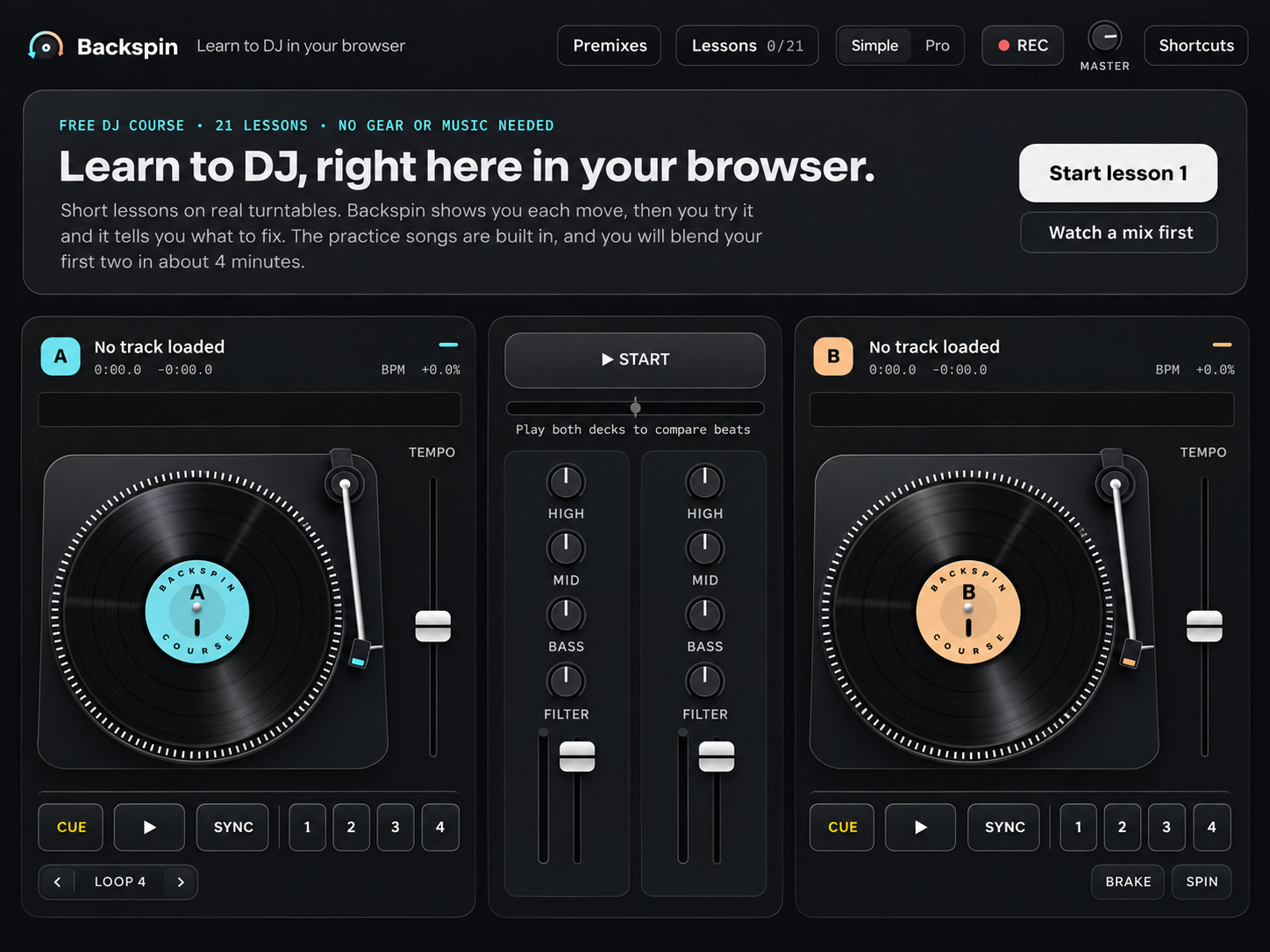
Backspin delivers a complete beginner DJ mixing course directly in your web browser. The platform provides twenty one free lessons covering beatmatching, scratching, and mixing fundamentals. No software installation required. No hardware purchase needed. Students access virtual turntables and built in music tracks instantly. The interface mimics professional DJ software layouts making transition to Serato DJ Pro or rekordbox seamless later. Built in tracks span house, techno, hip hop, and drum and bass genres. Each lesson includes practice mode and challenge mode for skill reinforcement.
How Virtual Turntables Work In Browser
The Backspin virtual deck system responds to mouse, keyboard, or touch input. Each deck displays waveform, BPM counter, and cue points. Crossfader and EQ controls function like hardware mixers. Students practice beatmatching by aligning waveforms visually and aurally. The browser audio engine maintains low latency comparable to dedicated DJ apps on iPad Air M2 or Android tablets. Lessons progress from basic tempo matching to advanced scratching techniques. Keyboard shortcuts mirror professional software hotkeys. Touch optimized controls work on Microsoft Surface Pro 9 or iPad Pro M4 for tablet practice.
Equipment Free Learning Advantage
Traditional DJ education requires significant upfront investment. Entry level controllers like Pioneer DJ DDJ-FLX4 or Numark Mixtrack Platinum FX cost hundreds. Professional headphones such as Audio-Technica ATH-M50x or Sennheiser HD 25 add more expense. Backspin eliminates these barriers completely. Learners develop core skills before purchasing gear. Many graduates transition to Native Instruments Traktor Kontrol S2 or Pioneer DJM-A9 setups with confidence. The platform teaches fundamentals that apply to any Technics SL-1200MK7 vinyl setup or CDJ-3000 digital player configuration.
Lesson Structure And Progression
The twenty one lesson curriculum builds systematically. Early modules cover music theory, song structure, and phrasing. Beatmatching exercises use built in tracks across genres. Scratching tutorials introduce baby scratch, chirp, and transformer techniques. Advanced lessons tackle harmonic mixing, EQ blending, and set programming. Each lesson includes interactive challenges with instant feedback. Progress tracking motivates consistent practice. Supplementary video lessons demonstrate hand positioning for scratching on physical platters. Downloadable practice tracks extend learning beyond browser sessions.
Browser Based Performance Benefits
Web based DJ platforms offer unique advantages. Cross device compatibility means practice on MacBook Pro M3, Windows laptop, or Chromebook. Cloud sync preserves progress across sessions. No driver conflicts or operating system limitations. The responsive design adapts to screen sizes from smartphone to ultrawide monitor. Offline mode caches lessons for practice without internet. Regular updates add new tracks and exercises automatically. Web Audio API ensures consistent audio quality across Chrome, Firefox, Safari, and Edge browsers. Web MIDI support enables hardware controller integration for hybrid practice.
From Virtual To Physical Transition
Skills transfer directly to hardware controllers. Muscle memory developed on virtual crossfader applies to Pioneer DJ DDJ-FLX4 or similar units. Waveform reading translates to Serato DJ Pro laptop displays. Cue point management mirrors rekordbox workflow. Graduates report faster learning curves when acquiring first controller. Some connect MIDI controllers to browser for hybrid practice. The platform supports Web MIDI API for compatible devices like Novation Launchpad Mini MK3 or Akai APC Mini MK2. This bridge approach accelerates readiness for club standard Pioneer CDJ-3000 and DJM-A9 installations.
Community And Additional Resources
Backspin includes community forums for peer feedback. Students share mixes for constructive criticism. Weekly challenges encourage creative application. Resource library offers downloadable cheat sheets for EQ techniques, harmonic mixing keys, and scratch notation. Video demonstrations supplement text lessons. Mobile optimized interface enables practice on iPad Air M2 during commute. The platform remains completely free with no premium tiers. Discord community connects learners globally for mix exchanges and technique discussions. Regular live streams feature guest instructors demonstrating advanced techniques on Pioneer DJ DDJ-FLX10 and Allen & Heath Xone:96 mixers.